
User Manual


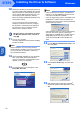


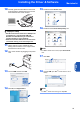


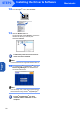
Table Of Contents
- Quick Setup Guide MFC-640CW
- Table of Contents
- Getting Started
- STEP1 Setting Up the Machine
- 1 Removing the protective parts
- 2 Installing the handset
- 3 Loading paper
- 4 Installing the phone line and power cord
- 5 Set Your Country (For Australia / New Zealand Customer Only)
- 6 Installing the ink cartridges
- 7 Print quality check
- 8 Setting the date and time
- 9 Setting your station ID
- 10 Choosing a Receive Mode
- 11 Setting up the TAD
- STEP2 Installing the Driver & Software
- For Network Users
- Consumables and Options
- brother ARL/ASA/NZ

Installing the Driver & Software
27
Macintosh
®
USB
Macintosh
®
For Mac OS
®
9.1 to 9.2
Important
Make sure that you have finished the
instructions from Step 1 Setting Up the
Machine on page 4-11.
1 Disconnect the machine from the power socket
and from your computer, if you already
connected an interface cable.
2 Turn on your Macintosh
®
.
3 Put the supplied CD-ROM into your CD-ROM
drive.
4 Double-click the Start Here OS 9.1-9.2 icon to
install the printer and scanner drivers. If the
language screen appears, choose your
language.
5 Click MFL-Pro Suite to install.
6 Follow the on-screen instructions, and restart
your Macintosh
®
.
7 Lift the scanner cover to its open position.
8 Connect the USB cable to the USB socket
marked with a symbol. You will find the
USB socket above and to the left of the ink
cartridge slots, as shown below.
9 Carefully guide the USB cable into the trench
as shown below, following the trench around
and toward the back of the machine.
Then, connect it to your Macintosh
®
.
Improper Setup
• DO NOT connect the machine to a USB port on
a keyboard or a non-powered USB hub.
Brother recommends that you connect the
machine directly to your computer.
• Make sure that the cable does not restrict the
cover from closing, or an error may occur.
10 Lift the scanner cover to release the lock.
Gently push the scanner cover support down
and close the scanner cover.
11 Turn on the machine by plugging in the power
cord.