
User Manual


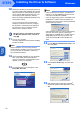


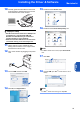


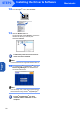
Table Of Contents
- Quick Setup Guide MFC-640CW
- Table of Contents
- Getting Started
- STEP1 Setting Up the Machine
- 1 Removing the protective parts
- 2 Installing the handset
- 3 Loading paper
- 4 Installing the phone line and power cord
- 5 Set Your Country (For Australia / New Zealand Customer Only)
- 6 Installing the ink cartridges
- 7 Print quality check
- 8 Setting the date and time
- 9 Setting your station ID
- 10 Choosing a Receive Mode
- 11 Setting up the TAD
- STEP2 Installing the Driver & Software
- For Network Users
- Consumables and Options
- brother ARL/ASA/NZ

Installing the Driver & Software
26
STEP2
Macintosh
®
USB
Macintosh
®
19 Choose MFC-XXXX (where XXXX is your
model name), and then click Add.
20 Click Printer Setup Utility, then
Quit Printer Setup Utility.
The MFL-Pro Suite, Brother printer driver,
scanner driver and Brother
ControlCenter2 have been installed and
the installation is now complete.
21 To install Presto!
®
PageManager
®
, click the
Presto! PageManager icon and follow the
on-screen instructions.
Note
When Presto!
®
PageManager
®
is installed OCR
capability is added to the Brother ControlCenter2.
You can easily scan, share and organize photos
and documents using Presto!
®
PageManager
®
.
Presto!
®
PageManager
®
has been
installed and the installation is now
complete.