
Owner's Manual






9 - 8 MAKING COPIES
Setting paper size
If copying on paper other than Letter size, you will need to change
the paper size setting.
1
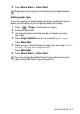
Press (Copy) to illuminate it in green.
2
Load your document.
3
Use the dial pad to enter the number of copies you want
(up to 99).
4
Press Copy Options
and
▲ or ▼ to select Paper Size.
Press
Menu/Set.
5
Press
▲ or ▼ to select the size of paper you are using
(Letter, Legal, A4, A5 or 4"(W)x 6"(H)).
Press
Menu/Set.
6
Press Black Start or Color Start.
Adjusting brightness
You can adjust the copy brightness to make copies darker or lighter.
1
Press (Copy) to illuminate it in green.
2
Load your document.
3
Use the dial pad to enter the number of copies you want
(up to 99).
4
Press Copy Options
and
▲ or ▼ to select Brightness.
Press
Menu/Set.
5
Press
▲ to make a lighter copy.
—OR—
Press
▼ to make a darker copy.
Press
Menu/Set.
6
Press Black Start or Color Start.
You can copy only on Letter, Legal, A4, A5 or
Photo Card (4"(W) x 6"(H)) paper.
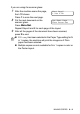
Brightness
- +