
Owner manual


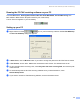
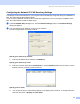

Table Of Contents
- SOFTWARE USER’S GUIDE
- Table of Contents
- Section I Windows®
- 1 Printing
- 2 Scanning
- Scanning a document using the TWAIN driver
- Scanning a document using the WIA driver (For Windows® XP only)
- Using the Scan key (For USB cable users)
- Using ScanSoft® PaperPort® 9.0SE and OmniPage® OCR
- 3 ControlCenter2
- 4 Network Scanning (For models with built-in network support)
- 5 Remote Setup (Not available for DCP models)
- 6 Brother PC-FAX Software (For MFC models only)
- PC-FAX sending
- Speed Dial setup
- Brother Address Book
- Setting up a member in the Address Book
- Setting up a group for broadcasting
- Editing member information
- Deleting a member or group
- Exporting the Address Book
- Importing to the Address Book
- Setting up a cover page
- Entering cover page information
- Sending a file as a PC-FAX using the Facsimile style user interface
- Sending a file as a PC-FAX using the Simple style user interface
- PC-FAX receiving (MFC-640CW and MFC-820CW only)
- 7 PhotoCapture Center™
- Section II Apple® Macintosh®
- 8 Printing and Faxing
- 9 Scanning
- 10 ControlCenter2
- 11 Network Scanning (For models with built-in network support)
- 12 Remote Setup & PhotoCapture Center™
- Index
- brother USA

Brother PC-FAX Software (For MFC models only)
92
Running the PC-FAX receiving software on your PC 6
Click the Start button, All Programs, Brother, MFL-Pro Suite MFC-XXXX, ‘PC-FAX Receiving’ then
MFC-XXXX or MFC-XXXX LAN (where XXXX is your model name).
The PC-FAX icon appears in your PC tasktray.
Setting up your PC 6
a Right-click the PC-FAX icon on your PC tasktray, and then click PC-Fax RX Setup.
The PC-Fax RX Setup dialog box appears:
b In Save file to, click the Browse button if you want to change the path where PC-FAX files are saved.
c In File Format, choose .tif or .max as the received document format. The default format is .tif.
d To play wave files when receiving a fax, check Play wave file when receiving FAX, and enter the path
of the wave file.
e To automatically start the PC-FAX receiving software when you start Windows
®
, check
AddtoStartupfolder.
f If you want to use the PC-FAX Receiving software, see the information below.