
Owner manual

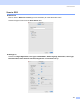


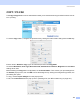
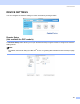
Table Of Contents
- SOFTWARE USER’S GUIDE
- Table of Contents
- Section I Windows®
- 1 Printing
- 2 Scanning
- Scanning a document using the TWAIN driver
- Scanning a document using the WIA driver (For Windows® XP only)
- Using the Scan key (For USB cable users)
- Using ScanSoft® PaperPort® 9.0SE and OmniPage® OCR
- 3 ControlCenter2
- 4 Network Scanning (For models with built-in network support)
- 5 Remote Setup (Not available for DCP models)
- 6 Brother PC-FAX Software (For MFC models only)
- PC-FAX sending
- Speed Dial setup
- Brother Address Book
- Setting up a member in the Address Book
- Setting up a group for broadcasting
- Editing member information
- Deleting a member or group
- Exporting the Address Book
- Importing to the Address Book
- Setting up a cover page
- Entering cover page information
- Sending a file as a PC-FAX using the Facsimile style user interface
- Sending a file as a PC-FAX using the Simple style user interface
- PC-FAX receiving (MFC-640CW and MFC-820CW only)
- 7 PhotoCapture Center™
- Section II Apple® Macintosh®
- 8 Printing and Faxing
- 9 Scanning
- 10 ControlCenter2
- 11 Network Scanning (For models with built-in network support)
- 12 Remote Setup & PhotoCapture Center™
- Index
- brother USA

ControlCenter2
140
COPY / PC-FAX 10
The Copy1-Copy4 buttons can be customized to allow you to use advanced copy and fax functions such as
N-in-1 printing.
To use the Copy buttons, configure the printer driver by clicking the button while holding down the Ctrl key.
Enter a name in Name for Copy (up to 30 characters) and choose Copy Ratio.
Choose the Resolution, Scan Type, Document Size, Show Scanner Interface, Brightness and Contrast
settings to be used.
Before finishing the Copy button configuration, set the Printer Name. Then choose your print settings from
the Presets pop-up menu, then click OK to close the dialog box. By clicking the configured copy button, the
print dialog box opens.
To copy, choose Copies & Pages from the pop-up menu.
To fax, choose Send Fax from the pop-up menu. (Sending a fax (For MFC models only) on page 107.)