
Manual




Table Of Contents
- USER’S GUIDE MFC-640CW
- Brother numbers
- Ordering accessories and supplies
- Safety precautions
- Choosing a location
- Quick Reference Guide
- How to access the complete User’s Guide
- How to access Brother Support (For Windows®)
- Table of Contents
- 1 Introduction
- 2 Getting started
- Initial Setup
- General Setup
- Setting the Mode Timer
- Setting the Paper Type
- Setting the Paper Size
- Setting the Ring Volume
- Setting the Beeper Volume
- Setting the Speaker Volume
- Setting the Handset Volume
- Choosing the Handset Volume (For Volume Amplify)
- Setting Volume Amplify
- Turning on Automatic Daylight Savings Time
- Setting the LCD Contrast
- 3 Setup Send
- 4 Setup Receive
- Basic receiving operations
- 5 Quick-Dial numbers and dialing options
- 6 Remote Fax Options (Black & White only)
- 7 Message Center
- Message Center mode
- Setting up the Message Center
- Recording Message Center Outgoing Message
- Activating Message Center mode
- Message indicator
- Playing voice messages
- Printing a fax message
- Erasing incoming messages
- Setting Maximum Time for incoming messages
- Setting Toll Saver
- ICM Recording Monitor
- Recording a conversation
- Record Fax/Tel Outgoing Announcement (F/T OGM)
- Message Center mode
- 8 Printing reports
- 9 Making copies
- 10 Walk-Up PhotoCapture Center™
- 11 Software and Network features
- 12 Important information
- 13 Troubleshooting and routine maintenance
- Appendix A
- Appendix B
- Glossary
- Specifications
- Index
- Remote Retrieval Access card
- brother US/CAN
ii
Brother fax back system (USA only)
Brother has installed an easy-to-use fax back system, so you can get
instant answers to common technical questions and product information for
all Brother products. This system is available 24 hours a day, 7 days a
week. You can use the system to receive faxed instructions and an Index of
fax back subjects.
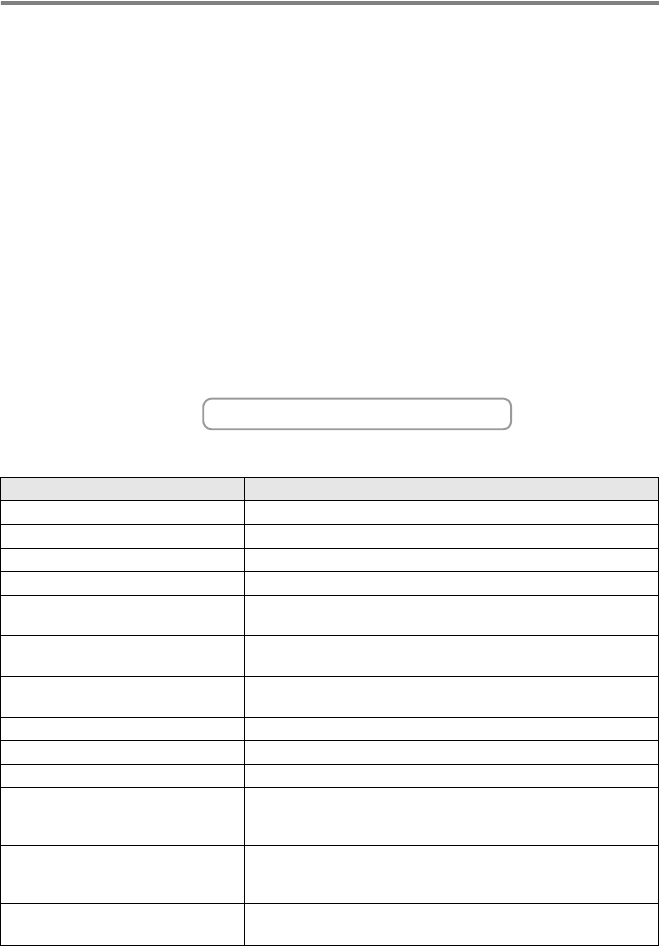
Ordering accessories and supplies
For best quality results use only genuine Brother accessories, which are
available at most Brother retailers. If you cannot find the accessory you
need and you have a Visa, MasterCard, Discover, or American Express
credit card, you can order accessories directly from Brother. (In the USA,
you can visit us online for a complete selection of the Brother accessories
and supplies that are available for purchase.)
In USA only: 1-800-521-2846
In USA: 1-888-879-3232 (voice)
1-800-947-1445 (fax)
In Canada: 1-877-BROTHER (voice)
Description Item
Ink Cartridge Standard <black> LC41BK (Prints up to approx. 500 pages)
Ink Cartridge <cyan> (blue) LC41C (Prints up to approx. 400 pages)
Ink Cartridge <magenta> (red) LC41M (Prints up to approx. 400 pages)
Ink Cartridge <yellow> LC41Y (Prints up to approx. 400 pages)
Premium Glossy Photo Paper
(Letter size / 20 sheets)
BP60 GLL
Matte Inkjet Paper
(Letter size / 25 sheets)
BP60 ML
Inkjet Plain Paper
(Letter size / 250 sheets)
BP60 PL
Telephone Line Cord LG3077001
Telephone Handset LE5803018
Handset Curled Cord UL8019005
Power Protector for A/C Power
Telephone Line Surges and
Voltage Spikes (2 outlets)
QPD120
Power Protector for A/C Power
Telephone Line Surges and
Voltage Spikes (8 outlets)
FX120
User's Guide LP0410001 (English for USA and Canada)
LP0410002 (French for Canada)
http://www.brothermall.com