
Manual

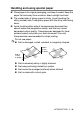

Table Of Contents
- USER’S GUIDE MFC-640CW
- Brother numbers
- Ordering accessories and supplies
- Safety precautions
- Choosing a location
- Quick Reference Guide
- How to access the complete User’s Guide
- How to access Brother Support (For Windows®)
- Table of Contents
- 1 Introduction
- 2 Getting started
- Initial Setup
- General Setup
- Setting the Mode Timer
- Setting the Paper Type
- Setting the Paper Size
- Setting the Ring Volume
- Setting the Beeper Volume
- Setting the Speaker Volume
- Setting the Handset Volume
- Choosing the Handset Volume (For Volume Amplify)
- Setting Volume Amplify
- Turning on Automatic Daylight Savings Time
- Setting the LCD Contrast
- 3 Setup Send
- 4 Setup Receive
- Basic receiving operations
- 5 Quick-Dial numbers and dialing options
- 6 Remote Fax Options (Black & White only)
- 7 Message Center
- Message Center mode
- Setting up the Message Center
- Recording Message Center Outgoing Message
- Activating Message Center mode
- Message indicator
- Playing voice messages
- Printing a fax message
- Erasing incoming messages
- Setting Maximum Time for incoming messages
- Setting Toll Saver
- ICM Recording Monitor
- Recording a conversation
- Record Fax/Tel Outgoing Announcement (F/T OGM)
- Message Center mode
- 8 Printing reports
- 9 Making copies
- 10 Walk-Up PhotoCapture Center™
- 11 Software and Network features
- 12 Important information
- 13 Troubleshooting and routine maintenance
- Appendix A
- Appendix B
- Glossary
- Specifications
- Index
- Remote Retrieval Access card
- brother US/CAN
INTRODUCTION 1 - 10
Handling and using special paper
■ Store paper in its original packaging, and keep it sealed. Keep the
paper flat and away from moisture, direct sunlight and heat.
■ The coated side of glossy paper is shiny. Avoid touching the
shiny (coated) side. Load glossy paper with the shiny side facing
down.
■ Avoid touching either side of transparencies because they
absorb water and perspiration easily, and this may cause
decreased output quality. Transparencies designed for laser
printers/copiers may stain your next document. Use only
transparencies recommended for inkjet printing.
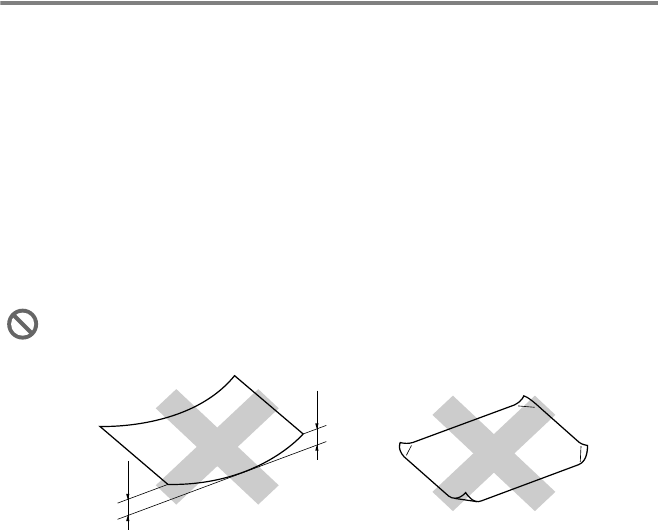
Do not use paper:
■ that is damaged, curled, wrinkled, or irregularly shaped
■ that is extremely shiny or highly textured
■ that was previously printed by a printer
■ that cannot be arranged uniformly when stacked
■ that is made with a short grain
0.08 in.
(2 mm)
or longer
0.08 in.
(2 mm)
or longer