
Manual
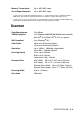
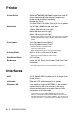

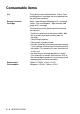

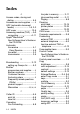


Table Of Contents
- USER’S GUIDE MFC-640CW
- Brother numbers
- Ordering accessories and supplies
- Safety precautions
- Choosing a location
- Quick Reference Guide
- How to access the complete User’s Guide
- How to access Brother Support (For Windows®)
- Table of Contents
- 1 Introduction
- 2 Getting started
- Initial Setup
- General Setup
- Setting the Mode Timer
- Setting the Paper Type
- Setting the Paper Size
- Setting the Ring Volume
- Setting the Beeper Volume
- Setting the Speaker Volume
- Setting the Handset Volume
- Choosing the Handset Volume (For Volume Amplify)
- Setting Volume Amplify
- Turning on Automatic Daylight Savings Time
- Setting the LCD Contrast
- 3 Setup Send
- 4 Setup Receive
- Basic receiving operations
- 5 Quick-Dial numbers and dialing options
- 6 Remote Fax Options (Black & White only)
- 7 Message Center
- Message Center mode
- Setting up the Message Center
- Recording Message Center Outgoing Message
- Activating Message Center mode
- Message indicator
- Playing voice messages
- Printing a fax message
- Erasing incoming messages
- Setting Maximum Time for incoming messages
- Setting Toll Saver
- ICM Recording Monitor
- Recording a conversation
- Record Fax/Tel Outgoing Announcement (F/T OGM)
- Message Center mode
- 8 Printing reports
- 9 Making copies
- 10 Walk-Up PhotoCapture Center™
- 11 Software and Network features
- 12 Important information
- 13 Troubleshooting and routine maintenance
- Appendix A
- Appendix B
- Glossary
- Specifications
- Index
- Remote Retrieval Access card
- brother US/CAN
SPECIFICATIONS S - 6
Scanner
Memory Transmission Up to 480
1
/400
2
pages
Out of Paper Reception Up to 480
1
/400
2
pages
1
“Pages” refers to the “Brother Standard Chart No. 1” (a typical business letter, Standard resolution,
MMR code). Specifications and printed materials are subject to change without prior notice.
2
"Pages" refers to the "ITU-T Test Chart #1" (a typical business letter, Standard resolution, MMR code).
Specifications and printed materials are subject to change without prior notice.
Color/Monochrome Color/Black
TWAIN Compliant Yes (Windows
®
98/98SE/Me/2000 Professional/XP)
Mac OS
®
9.1-9.2/Mac OS
®
X 10.2.4 or greater
WIA Compliant Yes (Windows
®
XP)
Color Depth 36 bit color Processing (Input)
24 bit color Processing (Output)
Resolution Up to 19200 × 19200 dpi (interpolated)
Up to 600 × 2400 dpi (optical)
Scanning Speed Color: up to 5.58 sec.
Black: up to 3.54 sec.
Letter size in 100 × 100 dpi
Document Size ADF Width: 5.8" to 8.5" (147 mm to 216 mm)
ADF Height: 5.8" to 14" (147 mm to 356 mm)
Scanner Glass Width: Max. 8.5" (Max. 216 mm)
Scanner Glass Height: Max. 11.7" (Max. 297 mm)
Scanning Width 8.26 in. (210 mm)
Gray Scale 256 levels