
Manual
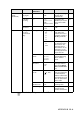
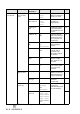
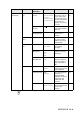
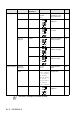


Table Of Contents
- USER’S GUIDE MFC-640CW
- Brother numbers
- Ordering accessories and supplies
- Safety precautions
- Choosing a location
- Quick Reference Guide
- How to access the complete User’s Guide
- How to access Brother Support (For Windows®)
- Table of Contents
- 1 Introduction
- 2 Getting started
- Initial Setup
- General Setup
- Setting the Mode Timer
- Setting the Paper Type
- Setting the Paper Size
- Setting the Ring Volume
- Setting the Beeper Volume
- Setting the Speaker Volume
- Setting the Handset Volume
- Choosing the Handset Volume (For Volume Amplify)
- Setting Volume Amplify
- Turning on Automatic Daylight Savings Time
- Setting the LCD Contrast
- 3 Setup Send
- 4 Setup Receive
- Basic receiving operations
- 5 Quick-Dial numbers and dialing options
- 6 Remote Fax Options (Black & White only)
- 7 Message Center
- Message Center mode
- Setting up the Message Center
- Recording Message Center Outgoing Message
- Activating Message Center mode
- Message indicator
- Playing voice messages
- Printing a fax message
- Erasing incoming messages
- Setting Maximum Time for incoming messages
- Setting Toll Saver
- ICM Recording Monitor
- Recording a conversation
- Record Fax/Tel Outgoing Announcement (F/T OGM)
- Message Center mode
- 8 Printing reports
- 9 Making copies
- 10 Walk-Up PhotoCapture Center™
- 11 Software and Network features
- 12 Important information
- 13 Troubleshooting and routine maintenance
- Appendix A
- Appendix B
- Glossary
- Specifications
- Index
- Remote Retrieval Access card
- brother US/CAN

B - 7 APPENDIX B
3.Copy 1.Quality Best
Normal
Fast
Selects the Copy
resolution for your
type of document.
9-13
2.Brightness —- +
- +
- +
- +
- +
Adjusts the
brightness.
9-13
3.Contrast —- +
- +
- +
- +
- +
Adjusts the contrast
for copies.
9-13
4.Color
Adjust
1.Red R:- +
R:- +
R:- +
R:- +
R:- +
Adjusts the amount
of Red in copies.
9-14
2.Green G:- +
G:- +
G:- +
G:- +
G:- +
Adjusts the amount
of Green in copies.
3.Blue B:- +
B:- +
B:- +
B:- +
B:- +
Adjusts the amount
of Blue in copies.
4
.
PhotoCapture
1.Print
Quality
— Normal
Photo
Selects the print
quality.
10-9
2.Paper &
Size
—
Letter Glossy
4"x 6" Glossy
5"x 7" Glossy
A4 Glossy
Letter Plain
A4 Plain
Letter Inkjet
A4 Inkjet
4"x 6" Inkjet
Selects the paper
and print size.
10-9
3.Brightness —- +
- +
- +
- +
- +
Adjusts the
brightness.
10-9
Main Menu Submenu Menu
Selections
Options Descriptions Page
The factory settings are shown in Bold.