
Manual




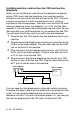


Table Of Contents
- USER’S GUIDE MFC-640CW
- Brother numbers
- Ordering accessories and supplies
- Safety precautions
- Choosing a location
- Quick Reference Guide
- How to access the complete User’s Guide
- How to access Brother Support (For Windows®)
- Table of Contents
- 1 Introduction
- 2 Getting started
- Initial Setup
- General Setup
- Setting the Mode Timer
- Setting the Paper Type
- Setting the Paper Size
- Setting the Ring Volume
- Setting the Beeper Volume
- Setting the Speaker Volume
- Setting the Handset Volume
- Choosing the Handset Volume (For Volume Amplify)
- Setting Volume Amplify
- Turning on Automatic Daylight Savings Time
- Setting the LCD Contrast
- 3 Setup Send
- 4 Setup Receive
- Basic receiving operations
- 5 Quick-Dial numbers and dialing options
- 6 Remote Fax Options (Black & White only)
- 7 Message Center
- Message Center mode
- Setting up the Message Center
- Recording Message Center Outgoing Message
- Activating Message Center mode
- Message indicator
- Playing voice messages
- Printing a fax message
- Erasing incoming messages
- Setting Maximum Time for incoming messages
- Setting Toll Saver
- ICM Recording Monitor
- Recording a conversation
- Record Fax/Tel Outgoing Announcement (F/T OGM)
- Message Center mode
- 8 Printing reports
- 9 Making copies
- 10 Walk-Up PhotoCapture Center™
- 11 Software and Network features
- 12 Important information
- 13 Troubleshooting and routine maintenance
- Appendix A
- Appendix B
- Glossary
- Specifications
- Index
- Remote Retrieval Access card
- brother US/CAN
A - 13 APPENDIX A
Installing machine, external two-line TAD and two-line
telephone
When you are installing an external two-line telephone answering
device (TAD) and a two-line telephone, your machine must be
isolated on one line at both the wall jack and at the TAD. The most
common connection is to put the machine on Line 2, which is
explained in the following steps. The back of the two-line TAD must
have two telephone jacks: one labeled L1 or L1/L2, and the other
labeled L2. You will need at least three telephone line cords, the one
that came with your machine and two for your external two-line TAD.
You will need a fourth line cord if you add a two-line telephone.
1
Place the two-line TAD and the two-line telephone next to your
machine.
2
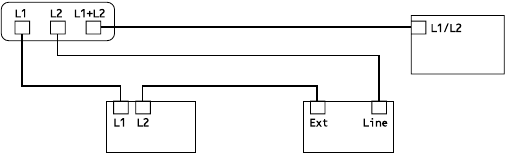
Plug one end of the telephone line cord for your machine into the
L2 jack of the triplex adapter. Plug the other end into the LINE
jack on the back of the machine.
3
Plug one end of the first telephone line cord for your TAD into
the L1 jack of the triplex adapter. Plug the other end into the L1
or L1/L2 jack of the two-line TAD.
4
Plug one end of the second telephone line cord for your TAD
into the L2 jack of the two-line TAD. Plug the other end into the
EXT. jack on the left side of the machine.
You can keep two-line telephones on other wall outlets as always.
There are two ways to add a two-line telephone to the machine’s wall
outlet. You can plug the telephone line cord from the two-line
telephone into the L1+L2 jack of the triplex adapter. Or, you can plug
the two-line telephone into the TEL jack of the two-line TAD.
Triplex Adapter
Two Line Phone
External Two Line TAD machine