
Manual

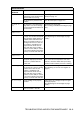

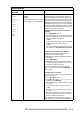


Table Of Contents
- USER’S GUIDE MFC-640CW
- Brother numbers
- Ordering accessories and supplies
- Safety precautions
- Choosing a location
- Quick Reference Guide
- How to access the complete User’s Guide
- How to access Brother Support (For Windows®)
- Table of Contents
- 1 Introduction
- 2 Getting started
- Initial Setup
- General Setup
- Setting the Mode Timer
- Setting the Paper Type
- Setting the Paper Size
- Setting the Ring Volume
- Setting the Beeper Volume
- Setting the Speaker Volume
- Setting the Handset Volume
- Choosing the Handset Volume (For Volume Amplify)
- Setting Volume Amplify
- Turning on Automatic Daylight Savings Time
- Setting the LCD Contrast
- 3 Setup Send
- 4 Setup Receive
- Basic receiving operations
- 5 Quick-Dial numbers and dialing options
- 6 Remote Fax Options (Black & White only)
- 7 Message Center
- Message Center mode
- Setting up the Message Center
- Recording Message Center Outgoing Message
- Activating Message Center mode
- Message indicator
- Playing voice messages
- Printing a fax message
- Erasing incoming messages
- Setting Maximum Time for incoming messages
- Setting Toll Saver
- ICM Recording Monitor
- Recording a conversation
- Record Fax/Tel Outgoing Announcement (F/T OGM)
- Message Center mode
- 8 Printing reports
- 9 Making copies
- 10 Walk-Up PhotoCapture Center™
- 11 Software and Network features
- 12 Important information
- 13 Troubleshooting and routine maintenance
- Appendix A
- Appendix B
- Glossary
- Specifications
- Index
- Remote Retrieval Access card
- brother US/CAN

13 - 1 TROUBLESHOOTING AND ROUTINE MAINTENANCE
13
Troubleshooting
Error messages
As with any sophisticated office product, errors may occur. If this
happens, your machine identifies the problem and displays an error
message. The most common error messages are shown below.
You can correct most problems by yourself. If you need additional
help, the Brother Solutions Center offers latest FAQs and
troubleshooting tips.
Visit us at http://solutions.brother.com
.
Troubleshooting and routine
maintenance
IMPORTANT
For technical help, you must call the country where you bought the
machine. Calls must be made from within that country.
ERROR MESSAGES
ERROR
MESSAGE
CAUSE ACTION
Comm.Error Poor phone line quality caused a
communication error.
Try the call again. If the problem continues, call
the telephone company and ask them to check
your phone line.
Connection
Fail
You tried to poll a fax machine that
is not in Polled Waiting mode.
Check the other fax machine’s polling setup.
Cover is Open The scanner cover is not closed
completely.
Lift the scanner cover and then close it again.
Data
Remaining
Print data remains in the
machine’s memory.
Re-start printing from your computer.
Print data remains in the
machine’s memory. The USB
cable was unplugged while the
computer was sending the data to
the machine.
Press Stop/Exit. The machine will cancel the
job and eject the page that is being printed.
Disconnected The other person or other person’s
fax machine stopped the call.
Try to send or receive again.