
Instruction Manual



Setting Up the Machine
10
STEP1
8 Setting your station ID
You should store your name and fax number to be
printed on all fax pages that you send.
1 Press Menu/Set.
2 Press 0.
3 Press 3.
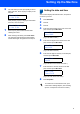
4 Enter your fax number (up to 20 digits) on the
dial pad, and then press Menu/Set.
Station ID
Fax:_
5 Enter your name (up to 20 characters) using
the dial pad, and then press Menu/Set.
Station ID
Name:_
Note
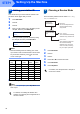
See the following chart for entering your name.
If you need to enter a character that is on the same
key as the last character, press to move the
cursor to the right.
6 Press Stop/Exit.
Note
If you want to repeat input, press Stop/Exit to start
from step 1.
For details, see Setting the Station ID in
Chapter 2 or Entering Text in Appendix B of
the User’s Guide.
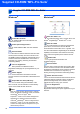
9 Choosing a Receive Mode
There are three possible receive modes: Fax Only,
Fax/Tel and Manual.
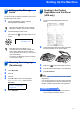
1 Press Menu/Set.
2 Press 0.
3 Press 1.
4 Press a or b to choose the mode.
5 Press Menu/Set.
6 Press Stop/Exit.
For details, see Setup Receive in Chapter 4
of the User’s Guide.
Press
key
One time Two
times
Three
times
Four
times
2 ABC2
3 DEF 3
4 GH I 4
5 JKL5
6 MNO6
7 PQRS
8 TUV8
9 WX Y Z
You control the phone line
and must answer every
call yourself.
Do you want to
receive a fax
automatically?
Manual
Your machine automatically
answers every call as a fax.
Fax Only
Your machine controls the
line and automatically
answers every call. If the
call is not a fax, it will ring
for you to pick up the call.
Fax/Tel
Yes
No
Do you use your
machine for faxes
only?
No
Yes