
User Manual
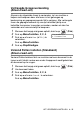

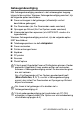
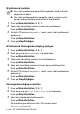
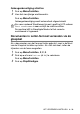


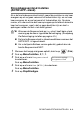

Table Of Contents
- GEBRUIKERSHANDLEIDING MFC-640CW
- INFORMATIE OVER GOEDKEURING
- Samenstelling en Publicatie
- EC Declaration Conformity
- Veiligheidsmaatregelen
- Een geschikte plaats kiezen
- Beknopt overzicht
- De gebruikershandleiding openen
- Inhoudsopgave
- 1 Inleiding
- 2 Aan de slag
- 3 Het Verzenden instellen
- De Faxmodus instellen
- Nummers kiezen
- Faxen versturen
- Basishandelingen bij het verzenden
- Geavanceerde verzendopties
- Groepsverzenden (Alleen zwart-wit)
- Internationale Modus
- Uitgestelde Fax (Alleen zwart-wit)
- Vertraagde Groepsverzending (Alleen zwart-wit)
- Verzend Pollen instellen (Standaard) (Alleen zwart-wit)
- Verzend Pollen instellen met Beveiligingscode (Alleen zwart-wit)
- Geheugenbeveiliging
- Documenten in Letter-formaat verzenden via de glasplaat
- 4 De Ontvangststand instellen
- Basishandelingen bij het ontvangen
- De Ontvangstmodus kiezen
- De Belvertraging instellen
- Stroombespaarstand instellen (ANTW.APP.-stand)
- De F/T-Beltijd instellen (alleen in Fax/Tel-modus)
- Uitgaand bericht voor Fax/Tel instellen
- Fax Waarnemen
- Een verkleinde afdruk van een inkomend document maken (Automatische Verkleining)
- Een fax ontvangen aan het einde van een gesprek
- Een fax uit het geheugen afdrukken
- Ontvangst in het geheugen (Alleen zwart-wit)
- Pollen
- Basishandelingen bij het ontvangen
- 5 Snelkiesnummers en kiesopties
- 6 Opties voor Faxen op Afstand (Alleen zwart-wit)
- 7 ANTW.APP. (antwoordapparaat)
- ANTW.APP.-modus
- ANTW.APP. instellen
- Uitgaand Bericht ANTW.APP. Opnemen
- Actieve ANTW.APP.-modus
- Berichtenindicator
- Voicemail afspelen
- Een faxbericht afdrukken
- Inkomende berichten wissen
- Maximale Lengte van voicemail instellen
- Bespaarstand instellen
- Luidspreker voor voicemail (IGB MON.)
- Een gesprek opnemen
- Fax/Tel Uitgaand Bericht Opnemen (F/T UITG.BER.)
- ANTW.APP.-modus
- 8 Rapporten afdrukken
- 9 Kopiëren
- 10 PhotoCapture Center™
- 11 Software- en netwerkfuncties
- 12 Belangrijke informatie
- 13 Problemen oplossen en routine onderhoud
- Bijlage A
- Bijlage B
- Verklarende woordenlijst
- Specificaties
- Index
- Opvragen Vanaf Een Ander Toestel - Overzicht
- brother DUT

DE ONTVANGSTSTAND INSTELLEN 4 - 2
Uw Ontvangstmodus kiezen of wijzigen
1
Wanneer het lampje niet groen oplicht, drukt u op (Fax).
2
Druk op Menu/Instellen, 0, 1.
3
Druk op ▲ of ▼ om Alleen Fax,
Fax/Telefoon, of Handmatig te
selecteren.
Druk op
Menu/Instellen.
4
Druk op Stop/Eindigen.
Stand.instel.
1.Ontvangstmodus
Huidige Ontvangstmodus
Fax : Alleen Fax
F/T : Fax/Tel
Hnd : Handmatig
Ant : Bericht Mgr
Als de ANTW.APP.-stand is
ingeschakeld, heeft deze stand
voorrang op de door u ingestelde
Ontvangstmodus. Het scherm toon
Ant:ber.centr.
Druk en houd de toets
ingedrukt tot oplicht.
UIT
Als de ANTW.APP.-stand is
uitgeschakeld, wordt de eerder door u
ingestelde Ontvangstmodus weer
geactiveerd. (Raadpleeg ANTW.APP.
(antwoordapparaat) op pagina 7-1.)