
User Manual


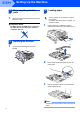
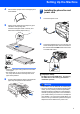
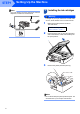
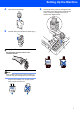
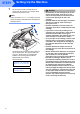
Table Of Contents

Setting Up the Machine
6
STEP1
Note
If you are sharing one phone line with an external
telephone, connect it as shown below.
5 Installing the ink cartridges
Warning
If ink gets in your eyes, wash them out with water
at once, and if irritation occurs consult a doctor.
1 Make sure that the power is turned on.
The LCD shows:
No Cartridge
Open scanner cover...
2 Lift the scanner cover (1) from the right-hand
side of the machine until it locks securely into
the open position.
3 Remove the yellow protective parts (1).
Note
Do not throw away the yellow protective parts. You
will need them if you transport the machine.
1
1