
Network User's Guide

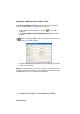
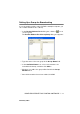
Table Of Contents
- IMPORTANT INFORMATION: REGULATIONS
- Table of Contents
- 1. Introduction
- 2. TCP/IP Configuration
- 3. Front Panel Setup
- 4. Network Printing from Windows® (Peer to Peer)
- 5. Network Printing from Macintosh®
- 6. Troubleshooting
- 7. Brother Internet Fax Printing Software
- Appendix
- INDEX

BROTHER INTERNET FAX PRINTING SOFTWARE 7 - 11
NC9100h_FM6.0
Setting Up a Group for Broadcasting
If you repeatedly send the same PC-FAX to multiple recipients, you
can combine members into a Group.
1
In the Brother Address Book dialog box, click the icon to
create a group.
The Brother Address Book Group Setup dialog box appears:
2
Type the name of the new group in the Group Name field.
3
In the Available Names box, select each member to be
included in the Group, and then click Add>>.
4
Members you add to the group will be listed in the Group
Members box.
5
After all the members have been added, click OK.