
Network User's Guide

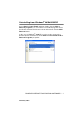
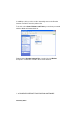
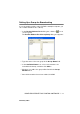
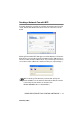
Table Of Contents
- IMPORTANT INFORMATION: REGULATIONS
- Table of Contents
- 1. Introduction
- 2. TCP/IP Configuration
- 3. Front Panel Setup
- 4. Network Printing from Windows® (Peer to Peer)
- 5. Network Printing from Macintosh®
- 6. Troubleshooting
- 7. Brother Internet Fax Printing Software
- Appendix
- INDEX

7 - 8 BROTHER INTERNET FAX PRINTING SOFTWARE
NC9100h_FM6.0
In addition to this you also need to manually remove the Brother
Internet Fax Driver from the printers list.
To do this select Start | Printers and Faxes you are then presented
with the Window illustrated below.
Right click the Brother Internet Fax, from the list click Delete.
Accept the confirmation and the driver will be deleted.