
Network User's Guide
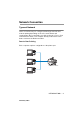
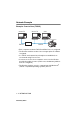

Table Of Contents
- IMPORTANT INFORMATION: REGULATIONS
- Table of Contents
- 1. Introduction
- 2. TCP/IP Configuration
- 3. Front Panel Setup
- 4. Network Printing from Windows® (Peer to Peer)
- 5. Network Printing from Macintosh®
- 6. Troubleshooting
- 7. Brother Internet Fax Printing Software
- Appendix
- INDEX

1 - 5 INTRODUCTION
NC9100h_FM6.0
Network Example
Example : Peer-to-Peer (TCP/IP)
• Each computer needs the TCP/IP and Print Protocol configured.
• The Brother machine needs to have an appropriate IP address
configured.
• If a TCP/IP environment has already been established, we
recommend using Peer-to-Peer.
• If routers are in use, then computers can access the Brother
machine through the routers. (In this case, the Gateway address
must be configured.)
• The Brother machine can also communicate with Macintosh
®
(TCP/IP compatible Operating Systems) devices.
Router
TCP/IPTCP/IP
Windows UNIXWindows
R
R
<Your machine>