
Operation Manual





16
To access the menu, press Menu/Set.
To exit, press Stop/Exit.
* The factory setting (option) is shown in bold.
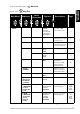
2. FAX
(Continued)
0.
MISCELLANEOUS
1. TX LOCK
—
Prohibits most functions
except receiving faxes.
39
2. BT CALL
SIGN
(
For U.K. only
)
ON
OFF
Use with BT Call Sign.
42
2. Distinctive
(
For Denmark
only
)
——
See
Danish
manual
included
on the
CD-ROM
3. COPY 1. QUALITY
—
NORMAL
BEST
FAST
Selects copy quality.
57
2. COLOUR
ADJUST
1. RED R:– +
R:– +
R:– +
R:– +
R:– +
Adjusts the amount of
Red in copies.
57
2. GREEN G:– +
G:– +
G:– +
G:– +
G:– +
Adjusts the amount of
Green in copies.
57
3. BLUE B:– +
B:– +
B:– +
B:– +
B:– +
Adjusts the amount of
Blue in copies.
57
3. CONTRAST
—
– +
– +
– +
– +
– +
Adjusts the contrast.
58
4.
TEST PRINT
———
You can print a test
sample page to check
print quality and adjust
the Vertical Alignment.
127
Main Menu
Menu
Selections
Options
Descriptions Page
Submenu
to accept