
Operation Manual




Setting Up and Using PC FAX (For Windows
®
Only) 101
PRINTER/SCANNER
5
Type the name of the file and select Open.
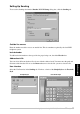
Setting Up Cover Page
Access the Brother PC Fax Cover Page Setting from the FAX Sending dialog box by clicking .
(See User interface, page 95.) The Brother PC-FAX Cover Page Setup dialog box will appear:
To
You can enter information in each box.
If you selected a text file in Step 1, the Files of type: will be Text file (*.csv).
If you are sending a fax to multiple recipients, the recipient information will not be
printed on the Cover Page.