
User Manual


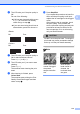


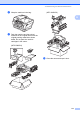

Table Of Contents
- USER’S GUIDE MFC-5890CN MFC-6490CW
- Approval Information and Compilation and Publication Notice
- Table of Contents
- Section I: General
- 1 General Information
- 2 Loading paper and documents
- 3 General setup
- 4 Security features
- Section II: Fax
- 5 Sending a Fax
- Entering Fax mode
- Broadcasting (Monochrome only)
- Additional sending operations
- Sending faxes using multiple settings
- Contrast
- Changing fax resolution
- Dual access (Monochrome only)
- Real time transmission
- Overseas Mode
- Delayed Faxing (Monochrome only)
- Delayed Batch Transmission (Monochrome only)
- Checking and cancelling waiting jobs
- Setting your changes as a new default
- Restoring all settings to the factory settings
- Sending a fax manually
- Out of Memory message
- 6 Receiving a Fax
- 7 Telephone and External devices
- Voice operations
- Telephone Service for Australia
- Telephone Service for New Zealand
- Telephone Service for Some Countries
- Connecting an external TAD (telephone answering device)
- External and extension telephones
- 8 Dialling and storing numbers
- 9 Printing Reports
- 10 Polling
- 5 Sending a Fax
- Section III: Copy
- 11 Making copies
- How to copy
- Copy settings
- Changing copy speed and quality
- Enlarging or reducing the image copied
- Making N in 1 copies or a poster (Page Layout)
- Sorting copies using the ADF
- Adjusting Brightness and Contrast
- Paper Options
- Skew Adjustment (MFC-6490CW only)
- Book Copy
- Watermark Copy
- Setting your changes as a new default
- Restoring all settings to the factory settings
- ‘Out of Memory’ message
- 11 Making copies
- Section IV: Direct Photo Printing
- Section V: Software
- Section VI: Appendixes
- A Safety and Legal
- B Troubleshooting and Routine Maintenance
- C Menu and Features
- D Specifications
- E Glossary
- Index
- brother ARL/ASA/NZ

176
CAUTION
Make sure that the plastic tabs on both
sides of the green protective part (1) have
securely clicked into place (2).
If you are not able to find the green
protective part, DO NOT remove the ink
cartridges before shipping. It is essential
that the machine be shipped with either the
green protective part or the ink cartridges in
position. Shipping without them will cause
damage to your machine and may void your
warranty. When travelling with the ink
cartridges still in the machine please keep
the machine upright as this will protect the
machine from leakage.
d Unplug the machine from the telephone
wall socket and take the telephone line
cord out of the machine.
e Unplug the machine from the electrical
socket and from the machine.
f (MFC-5890CN)
Using both hands, use the finger holds
on both sides of the machine to lift the
scanner cover until it locks securely into
the open position. Then unplug the
interface cable from the machine, if it is
connected.
(MFC-6490CW)
Using both hands, use the finger holds
on both sides of the machine to lift the
scanner cover into the open position.
Then unplug the interface cable from the
machine, if it is connected.
g (MFC-5890CN)
Lift the scanner cover (1) to release the
lock. Gently push the scanner cover
support down (2) and close the scanner
cover (3).
(MFC-6490CW)
Gently close the scanner cover using
the finger holds on both sides of it as you
push down on the Scanner Cover
Support (1).
WARNING
Be careful not to trap your fingers under the
scanner cover.
Always use the finger holds provided on
both sides of the scanner cover when
opening and closing it.
1
2
1