
User Manual



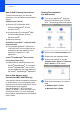
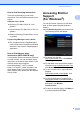

Table Of Contents
- USER’S GUIDE MFC-5890CN MFC-6490CW
- Approval Information and Compilation and Publication Notice
- Table of Contents
- Section I: General
- 1 General Information
- 2 Loading paper and documents
- 3 General setup
- 4 Security features
- Section II: Fax
- 5 Sending a Fax
- Entering Fax mode
- Broadcasting (Monochrome only)
- Additional sending operations
- Sending faxes using multiple settings
- Contrast
- Changing fax resolution
- Dual access (Monochrome only)
- Real time transmission
- Overseas Mode
- Delayed Faxing (Monochrome only)
- Delayed Batch Transmission (Monochrome only)
- Checking and cancelling waiting jobs
- Setting your changes as a new default
- Restoring all settings to the factory settings
- Sending a fax manually
- Out of Memory message
- 6 Receiving a Fax
- 7 Telephone and External devices
- Voice operations
- Telephone Service for Australia
- Telephone Service for New Zealand
- Telephone Service for Some Countries
- Connecting an external TAD (telephone answering device)
- External and extension telephones
- 8 Dialling and storing numbers
- 9 Printing Reports
- 10 Polling
- 5 Sending a Fax
- Section III: Copy
- 11 Making copies
- How to copy
- Copy settings
- Changing copy speed and quality
- Enlarging or reducing the image copied
- Making N in 1 copies or a poster (Page Layout)
- Sorting copies using the ADF
- Adjusting Brightness and Contrast
- Paper Options
- Skew Adjustment (MFC-6490CW only)
- Book Copy
- Watermark Copy
- Setting your changes as a new default
- Restoring all settings to the factory settings
- ‘Out of Memory’ message
- 11 Making copies
- Section IV: Direct Photo Printing
- Section V: Software
- Section VI: Appendixes
- A Safety and Legal
- B Troubleshooting and Routine Maintenance
- C Menu and Features
- D Specifications
- E Glossary
- Index
- brother ARL/ASA/NZ

Chapter 1
4
How to find Scanning instructions 1
There are several ways you can scan
documents. You can find the instructions as
follows:
Software User’s Guide
Scanning (For Windows
®
2000
Professional/Windows
®
XP and
Windows Vista
®
)
ControlCenter3 (For Windows
®
2000
Professional/Windows
®
XP and
Windows Vista
®
)
Network Scanning
ScanSoft™ PaperPort™ 11SE with OCR
How-to-Guides
The complete ScanSoft™ PaperPort™
11SE with OCR How-to-Guides can be
viewed from the Help selection in the
ScanSoft™ PaperPort™ 11SE
application.
Presto!
®
PageManager
®
User’s Guide
(Hong Kong users only)
Instructions for scanning directly from
Presto!
®
PageManager
®
. The complete
Presto!
®
PageManager
®
User’s Guide
can be viewed from the Help selection in
the Presto!
®
PageManager
®
application.
How to find Network setup
instructions (MFC-6490CW only)
1
Your machine can be connected to a wireless
or wired network. You can find basic setup
instructions in the Quick Setup Guide. If your
wireless access point supports
SecureEasySetup™, Wi-Fi Protected
Setup™ or AOSS™, follow the steps in the
Quick Setup Guide. For more information
about network setup please see the Network
User’s Guide.
Viewing Documentation
(For Macintosh
®
) 1
a Turn on your Macintosh
®
. Insert the
Brother CD-ROM into your CD-ROM
drive. The following window will appear.
b Double-click the Documentation icon.
c Double-click your language folder.
d Double-click top.html to view the
Software User's Guide and Network
User's Guide in HTML format.
e Click the documentation you want to
read:
Software User’s Guide
Network User’s Guide