
Operation Manual





Menu and Features
193
C
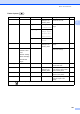
Phone Book ( )
Fax Preview ( )
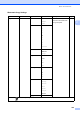
Cropping On*
Off
— — Crops the image around the
margin to fit the paper size
or print size. Turn this
feature off if you want to
print whole images or
prevent unwanted
cropping.
113
Borderless On*
Off
— — Expands the printable area
to fit the edges of the paper.
113
Date Print
(Not available for
DPOF printing)
On
Off*
— — Prints the date on your
photo.
113
Set New Default
——Yes
No
You can save your print
settings.
114
Factory Re set ——Yes
No
You can restore all the
settings to factory settings.
114
Level1 Level2 Level3 Options Descriptions Page
Search ——Alphabetical
Order
Numerical Order
You can dial by pressing
only a few keys (and Start).
73
Set One Touch
Dial
— — — Stores One Touch Dial
numbers, so you can dial by
pressing only a few keys
(and Start).
74
Set Speed Dial
———Stores Speed Dial
numbers, so you can dial by
pressing only a few keys
(and Start).
76
Setup Grou ps — — — Sets up a Group number for
Broadcasting.
79
The factory settings are shown in Bold with an asterisk.
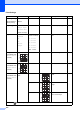
Level1 Level2 Level3 Options Descriptions Page
Fax Preview ——On
Off*
You can view received
faxes (and faxes to be
sent), on the LCD.
58
The factory settings are shown in Bold with an asterisk.
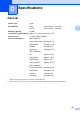
Option1 Option2 Option3 Option4 Descriptions Page
The factory settings are shown in Bold with an asterisk.