
Operation Manual






Menu and Features
187
C
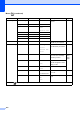
Brightness ——
Adjusts the brightness of
copies.
92
Contrast ——
Adjusts the contrast of
copies.
93
Stack/Sort ——Stack*
Sort
You can choose to stack or
sort multiple copies.
92
Page Layou t — Off(1 in 1)*
2in1(P)
2in1(L)
4in1(P)
4in1(L)
1to2
(MFC-6490CW)
Poster(2 x 2)
Poster(3 x 3)
(MFC-6490CW)
If you choose A3
or Ledger.
(When 2 in 1 is
chosen)
LGRx2 i LGRx1
LTRx2 i LGRx1
A3x2 i A3x1
A4x2 i A3x1
(When
Poster(2x2) is
chosen)
LGRx1 i LGRx4
LTRx1 i LGRx4
A4x1 i A3x4
A3x1 i A3x4
You can make N in 1,
1to2 or Poster copies.
90
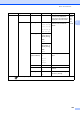
Skew Adjustment
(MFC-6490CW)
——Auto*
Off
If your scanned copy is
skewed, your machine can
correct the data
automatically.
94
Book Copy On — — Corrects dark borders and
skew when copying from
the scanner glass.
94
On(Preview) Skew Adjustment —
Shadow Revise —
Off* ——
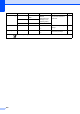
Level1 Level2 Level3 Options Descriptions Page
The factory settings are shown in Bold with an asterisk.
+2
+1
-1
-2
Light
Dark
+2
+1
-1
-2