
Operation Manual



Chapter 12
110
PhotoCapture Center™ print settings 12
You can change the print settings temporarily.
The machine returns to its default settings after 3 minutes, or if the Mode Timer returns the
machine to Fax mode. (See Mode Timer on page 26.)
Note
You can save the print settings you use most often by setting them as the default. (See Setting
your changes as a new default on page 114.)
1 No. of prints
(For View Photo(s), Search by Date, Slide Show)
You can see the total number of photos that will be printed.
(For Print All Photos, Print Photos, Enhance Photos, Trimming)
You can see the number of copies of each photo that will be printed.
(For DPOF printing) This does not appear.
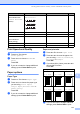
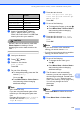
Menu Selections Options 1 Options 2 Page
Print Quality
(Not available for
DPOF printing)
Normal/Photo — 111
Paper Type Plain Paper/Inkjet Paper/
Brother BP71/Other Glossy
— 111
Paper Size
10x15cm/13x18cm/
A4/A3/Letter/Ledger
(When A4 or Letter is chosen)
8 x 10cm/ 9 x 13cm/
10 x 15cm/13 x 18cm/
15 x 20cm/Max. Size
111
Brightness
(Not available when
Enhance Photos is
chosen)
— 112
Contrast
(Not available when
Enhance Photos is
chosen)
— 112
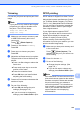
Print Setting
Print Quality
PHOTO
Paper Type
Paper Size
0
Brightness
10 x 15 cm
Other Glossy
0001
Photo
Print Press Start
Print Size Max. Size
1
Dark
Light