
User Manual
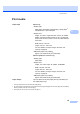
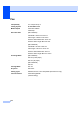
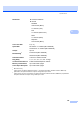
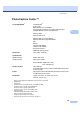

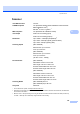
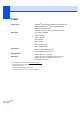
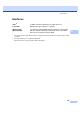
Table Of Contents
- USER’S GUIDEMFC-5890CN MFC-6490CW
- Approval Information and Compilation and Publication Notice
- Table of Contents
- Section I General
- 1 General Information
- 2 Loading paper and documents
- 3 General setup
- 4 Security features
- Section II Fax
- 5 Sending a Fax
- Entering Fax mode
- Broadcasting (Monochrome only)
- Additional sending operations
- Sending faxes using multiple settings
- Contrast
- Changing fax resolution
- Dual access (Monochrome only)
- Real time transmission
- Overseas Mode
- Delayed Faxing (Monochrome only)
- Delayed Batch Transmission (Monochrome only)
- Checking and cancelling waiting jobs
- Setting your changes as a new default
- Restoring all settings to the factory settings
- Sending a fax manually
- Out of Memory message
- 6 Receiving a Fax
- 7 Telephone and External devices
- 8 Dialling and storing numbers
- 9 Printing Reports
- 10 Polling
- 5 Sending a Fax
- Section III Copy
- 11 Making copies
- How to copy
- Copy settings
- Changing copy speed and quality
- Enlarging or reducing the image copied
- Making N in 1 copies or a poster (Page Layout)
- Sorting copies using the ADF
- Adjusting Brightness and Contrast
- Paper Options
- Skew Adjustment (MFC-6490CW only)
- Book Copy
- Watermark Copy
- Setting your changes as a new default
- Restoring all settings to the factory settings
- ‘Out of Memory’ message
- 11 Making copies
- Section IV Direct Photo Printing
- Section V Software
- Section VI Appendixes
- A Safety and Legal
- B Troubleshooting and Routine Maintenance
- C Menu and Features
- D Specifications
- E Glossary
- Index
- brother CHN-ENG

208
Printer D
1
For the latest driver updates, visit http://solutions.brother.com.
2
Based on Brother standard pattern.
A4 size in draft mode.
3
When you set the Borderless feature to On.
4
See Paper type and size for each operation on page 21.
Printer Driver
Windows
®
2000 Professional/XP/XP Professional x64
Edition/Windows Vista
®
driver supporting Brother
Native Compression mode
Mac OS
®
X 10.2.4 or greater
1
: Brother Ink Driver
Resolution Up to 1200 × 6000 dpi
1200 × 2400 dpi
1200 × 1200 dpi
600 × 600 dpi
600 × 300 dpi
600 × 150 dpi (color)
450 × 300 dpi (Mono)
Print Speed
Up to 35 pages/minute (Mono)
2
Up to 28 pages/minute (color)
2
Printing Width
291 mm (297 mm)
3
(A3 size)
Borderless
Ledger, A3, Letter, A4, A6, B4, Photo (10
×
15 cm),
Photo L (89
×
127 mm), Photo 2L (13
×
18 cm),
Index Card, Post Card
4