
User Manual


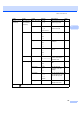

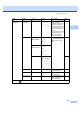

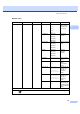


Table Of Contents
- USER’S GUIDEMFC-5890CN MFC-6490CW
- Approval Information and Compilation and Publication Notice
- Table of Contents
- Section I General
- 1 General Information
- 2 Loading paper and documents
- 3 General setup
- 4 Security features
- Section II Fax
- 5 Sending a Fax
- Entering Fax mode
- Broadcasting (Monochrome only)
- Additional sending operations
- Sending faxes using multiple settings
- Contrast
- Changing fax resolution
- Dual access (Monochrome only)
- Real time transmission
- Overseas Mode
- Delayed Faxing (Monochrome only)
- Delayed Batch Transmission (Monochrome only)
- Checking and cancelling waiting jobs
- Setting your changes as a new default
- Restoring all settings to the factory settings
- Sending a fax manually
- Out of Memory message
- 6 Receiving a Fax
- 7 Telephone and External devices
- 8 Dialling and storing numbers
- 9 Printing Reports
- 10 Polling
- 5 Sending a Fax
- Section III Copy
- 11 Making copies
- How to copy
- Copy settings
- Changing copy speed and quality
- Enlarging or reducing the image copied
- Making N in 1 copies or a poster (Page Layout)
- Sorting copies using the ADF
- Adjusting Brightness and Contrast
- Paper Options
- Skew Adjustment (MFC-6490CW only)
- Book Copy
- Watermark Copy
- Setting your changes as a new default
- Restoring all settings to the factory settings
- ‘Out of Memory’ message
- 11 Making copies
- Section IV Direct Photo Printing
- Section V Software
- Section VI Appendixes
- A Safety and Legal
- B Troubleshooting and Routine Maintenance
- C Menu and Features
- D Specifications
- E Glossary
- Index
- brother CHN-ENG

174
General Setup
(Continued)
Sleep Mode — 1Min
2Mins
3Mins
5Mins
10Mins*
30Mins
60Mins
You can choose how long
the machine will remain
idle before it goes into
sleep mode.
31
A3 - Short Grain
— On
Off*
Turn on this setting when you
use A3 short grain paper.
30
Function Lock Set Password
Lock OffiOn
Setup User
Reset All Users
— You can restrict selected
machine operation for up to
20 restricted users and all
other non-authorized
Public users.
34
Fax Setup Receive Ring Delay 0 - 10 (2*) Sets the number of rings
before the machine
answers in Fax Only or
Fax/Tel mode.
51
F/T Ring Time 20Secs
30Secs*
40Secs
70Secs
Sets the pseudo/double-
ring time in Fax/Tel mode.
51
Fax Detect On*
Off
Receives fax messages
without pressing the
Mono Start or Color Start
key.
52
Remote Codes On*
( 51, #51)
Off
Allows you to answer all calls at
an extension or external
telephone and use codes to turn
the machine on or off. You can
personalize these codes.
69
Mono/Color Mono(Max.A3)*
Color(Max.A4)
Choose the receive options
for incoming faxes.
54
Auto Reduction
On*
Off
Cuts the size of incoming
faxes.
53
Level1 Level2 Level3 Options Descriptions Page
The factory settings are shown in Bold with an asterisk.