
Quick Setup Guide
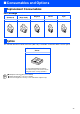

Table Of Contents
- Quick Setup Guide MFC-5440CN/MFC-5840CN
- Getting Started
- Table of Contents
- Step1 Setting Up the Machine
- 1 Removing the Protective Parts
- 2 Loading Paper
- 3 Installing the Phone Line and Power Cord
- 4 Installing the Ink Cartridges
- 5 Print Quality Check
- 6 Setting the Date and Time
- 7 Setting Your Station ID
- 8 Selecting a Receive Mode
- 9 Selecting Your Language (Canada only)
- 10 Sending in the Product Registration and Test Sheet (USA only)
- Step2 Installing the Driver & Software
- For Network Users
- Consumables and Options
- brother USA

35
Ink Cartridge
The external wireless Print/Scan server (802.11b) is available for Brother MFC’s as an option.
Replacement Consumables
Black
(Standard)
Black
(High Yield)
Magenta Yellow Cyan
LC41BK LC41HYBK LC41M LC41Y LC41C
Option
External Wireless Print/Scan
Server
NC-2200w
The optional External Wireless Print/Scan
Server (NC-2200w) provides wireless network
printing and network scanning capabilities.
■
Requires USB 2.0 cable (not included).
■
Supports Mac OS
®
X 10.2.4 or greater.
■
You can assign the scan key to one networked computer only.
■ Consumables and Options