
Quick Setup Guide

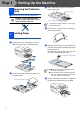
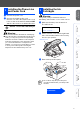

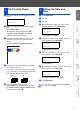
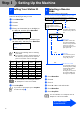

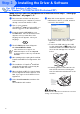
Table Of Contents
- Quick Setup Guide
- Quick Setup Guide
- Ръководство за Бързо Инсталиране
- Стъпка1 Инсталация на устройството
- Стъпка2 Инсталиране на драйвера и софтуера
- За потребители в компютърна мрежа
- Ghid rapid de setare
- Pasul1 Instalarea şi configurarea echipamentului
- Pasul2 Instalarea driverului şi a software-ului
- Pentru utilizatorii de reţea

3
Setting Up
the Machine
Windows
®
Mac OS
®
XMac OS
®
8.6-9.2
Windows
®
Network
For
Network Users
Macintosh
®
Network
1
Connect the power cord.
2
Connect the telephone line cord.
Connect one end of the telephone line cord
to the socket on the machine marked
LINE
and the other end to a modular wall socket.
DO NOT connect the USB cable yet.
Warning
■ The machine must be fitted with an earthed plug.
■ Since the machine is grounded through the power
outlet, you can protect yourself from potentially
hazardous electrical conditions on the telephone
network by keeping the power switched on when
you connect the machine to a telephone line.
Similarly, you can protect yourself when you want
to move your machine by disconnecting the
telephone line first and then the power cord.
.
Warning
If ink gets in your eyes wash them with water
immediately, and if irritation occurs consult a doctor.
1
Make sure that the power is turned on.
The LCD shows:
2
Lift the scanner cover from the right-hand
side of the machine until it locks securely
into the open position.
3
Remove the protective parts.
3
Installing the Phone Line
and Power Cord
4
Installing the Ink
Cartridges
No Cartridge
Open scanner...
Do not throw away the protective parts.
You will need them when you transport the
machine.
Scanner Cover
Continued...