
Quick Setup Guide
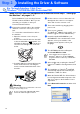


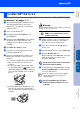
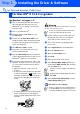



Table Of Contents
- Quick Setup Guide
- Quick Setup Guide
- Ръководство за Бързо Инсталиране
- Стъпка1 Инсталация на устройството
- Стъпка2 Инсталиране на драйвера и софтуера
- За потребители в компютърна мрежа
- Ghid rapid de setare
- Pasul1 Instalarea şi configurarea echipamentului
- Pasul2 Instalarea driverului şi a software-ului
- Pentru utilizatorii de reţea

16
■ For Network Users
This section is for using the machine on a network.
An administrator should set up the machine using the following steps.
The BRAdmin Professional utility is designed to manage your Brother network connected
devices such as network-ready Multifunction devices and/or network-ready printers in a Local
Area Network (LAN) environment.
BRAdmin Professional can also be used to manage devices from other manufacturers whose
products support SNMP (Simple Network Management Protocol).
For more information on BRAdmin Professional go to http://solutions.brother.com
1
Insert the supplied CD-ROM into your CD-ROM drive.
The opening screen will appear automatically.
Follow the on-screen instructions.
2
Click the Install Optional Applications icon on the main menu screen.
3
Click BRAdmin Professional and follow the on-screen instructions.
1
Start BRAdmin Professional, and select TCP/IP.
2
Select Search Active Devices from the Devices menu.
BRAdmin will search for new devices automatically.
3
Double-click the new device.
4
Enter the
IP Address
,
Subnet Mask
and
Gateway
, and then click the
OK
button.
5
The address information will be saved to the machine.
Installing the BRAdmin Professional
Configuration Utility (Windows
®
only)
The default password for the print server is “access”. You can use BRAdmin Professional to change this
password.
Setting your IP Address, Subnet Mask and
Gateway using BRAdmin Professional
(Windows
®
only)
The default password for the print server is “access”. You can use BRAdmin Professional to change this
password.