
Quick Setup Guide
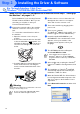


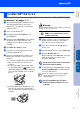
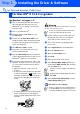



Table Of Contents
- Quick Setup Guide
- Quick Setup Guide
- Ръководство за Бързо Инсталиране
- Стъпка1 Инсталация на устройството
- Стъпка2 Инсталиране на драйвера и софтуера
- За потребители в компютърна мрежа
- Ghid rapid de setare
- Pasul1 Instalarea şi configurarea echipamentului
- Pasul2 Instalarea driverului şi a software-ului
- Pentru utilizatorii de reţea

11
A
The installation of the Brother drivers will
automatically start. The installation screens
appear one after another, please wait for a
while.
B
If the machine is configured for your
network, select the machine from the list,
and then click Next.
If the machine is not yet configured for use
on your network, the Configure IP Address
window will appear. Enter the IP address
information appropriate to your network by
following the on-screen instructions.
C
When the Brother and ScanSoft on-line
Registration screen is displayed, make your
selection and follow the on-screen
instructions.
D
Click Finish to restart your computer.
E
After restarting the computer, the
Installation Diagnostics will run
automatically and the installation results
window will be shown.
The MFL-Pro Suite, Brother Network
Printer driver, Network Scanner driver
and Network PhotoCapture Center
™
have been installed and the installation
is now complete.
This window will not appear if there is only
one machine connected on the network, it
will be selected automatically.
For network installations the Repair MFL-Pro
Suite selection from the main menu is not
supported.
Installing the Driver & Software
Setting Up
the Machine
For
Network Users
Windows
®
Network