
Network User's Guide for Internet Fax

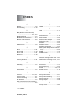
Table Of Contents
- Internet FAX User’s Guide
- Table of Contents
- 1 Control Panel Setup
- 2 Internet FAX
- 3 Configuring Internet Printing for Windows®
- Internet Printing Installation
- Overview
- Brother Internet Print General Information
- Brother Internet Print Configuring the Brother Print/Fax Server
- Brother Internet Print Using BRAdmin Professional utility to Configure the Print Server
- Brother Internet Print Installing the BIP software on Windows® 98/Me/2000/XP
- Adding a Second Brother Internet Port
- Other Sources of Information
- Internet Printing Installation
- INDEX

CONFIGURING INTERNET PRINTING FOR WINDOWS
®
3 - 8
NC9100h_FM6.0
You have now finished installing the BIP software. If you need to
configure another remote Print/Fax server, go to the next section,
“Adding a Second Brother Internet Port”.
Adding a Second Brother Internet Port
You should not re-run the install program to add a new Brother
Internet Port. Instead, press the Start button, select Settings, and
open the Printers window. Click on the icon of a machine that is
using BIP, select File from the menu bar, and then choose
Properties. Click on the Details tab and push the Add Port button.
In the Add Port dialog, select the Other radio button (Windows
®
98/
Me only) and then Brother Internet Port. Click OK and it will give
you the Port Name text box. Any unique name can be given here as
long as it starts with “BIP” and another port does not already exist
with the same name.
Other Sources of Information
Visit Microsoft’s web site for the “Microsoft Internet Print Services”
software for Windows
®
98/Me.