
Network User's Guide for Internet Fax

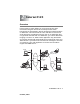


Table Of Contents
- Internet FAX User’s Guide
- Table of Contents
- 1 Control Panel Setup
- 2 Internet FAX
- 3 Configuring Internet Printing for Windows®
- Internet Printing Installation
- Overview
- Brother Internet Print General Information
- Brother Internet Print Configuring the Brother Print/Fax Server
- Brother Internet Print Using BRAdmin Professional utility to Configure the Print Server
- Brother Internet Print Installing the BIP software on Windows® 98/Me/2000/XP
- Adding a Second Brother Internet Port
- Other Sources of Information
- Internet Printing Installation
- INDEX

INTERNET FAX 2 - 1
2
NC9100h_FM6.0
2
Internet FAX
Overview
Internet Faxing (I-FAX) allows you to send and receive FAX
documents using the Internet as the transport mechanism.
Documents are transmitted in E-mail messages as attached TIFF-F
or JPEG files. This means that PC's are also able to receive and
send documents, providing that the PC has as an application that
can generate and view TIFF-F or JPEG files, you can use Microsoft
®
Imaging or a TIFF-F or JPEG viewer application. Any documents
sent via the machine will automatically be converted into a TIFF-F or
JPEG format. If you wish to send and receive messages to and from
your machine, your mail application on the PC must be able to
support the MIME format.
E-mail
Internet
Internet
Fax
Internet
Relay
E-mail
Relay
Fax (G3 TX)
E-mail