
User Manual

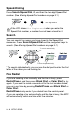

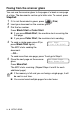


Table Of Contents
- USER’S GUIDE MFC-5440CN/MFC-5840CN
- Brother numbers
- Ordering accessories and supplies
- Safety precautions
- Choosing a location
- Quick Reference Guide
- Table of Contents
- 1 Introduction
- 2 Getting started
- Initial Setup
- General Setup
- Setting the Mode Timer
- Setting the Paper Type
- Setting the Paper Size
- Setting the Ring Volume
- Setting the Beeper Volume
- Setting the Speaker Volume
- Turning on Automatic Daylight Savings Time
- Setting the LCD Contrast
- Setting the Tray Use for Copy mode (MFC-5840CN only)
- Setting the Tray Use for Fax mode (MFC-5840CN only)
- 3 Setup Send
- 4 Setup Receive
- 5 Quick-Dial numbers and dialing options
- 6 Remote Fax Options (Not available for color faxes)
- 7 Printing reports
- 8 Making copies
- 9 Walk-Up PhotoCapture Center™ (MFC-5840CN only)
- 10 Important information
- 11 Troubleshooting and routine maintenance
- Appendix A
- Appendix B
- Glossary
- Specifications
- Index
- Remote Retrieval Access card
- brother USA/CAN

3 - 2 SETUP SEND
Speed-Dialing
Press
Search/Speed Dial
,
#
, and then the two digit Speed-Dial
number. (See
Storing Speed-Dial numbers
on page 5-1.)
Search
You can search for names you have stored in the Speed-Dial
memories. Press
Search/Speed Dial
and the navigation keys to
search. (See
Storing Speed-Dial numbers
on page 5-1.)
* To search alphabetically, you can use the dial pad to enter the first
letter of the name you are looking for.
Fax Redial
If you are sending a fax manually and the line is busy, press
Redial/Pause
, and then press
Black Start
or
Color Start
to try
again. If you want to make a second call to the last number dialed,
you can save time by pressing
Redial/Pause
and
Black Start
or
Color Start
.
Redial/Pause
only works if you dialed from the control panel.
If you are sending a fax automatically
and the line is busy, the MFC
will automatically redial one time after five minutes.
If the LCD shows
Not Registered
when you enter the
Speed-Dial number, a number has not been stored for it.
two-digit number
To search alphabetically*
To search numerically
or