
User Manual

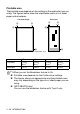

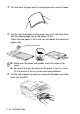

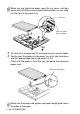
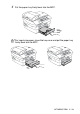
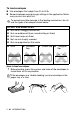
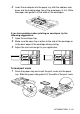
Table Of Contents
- USER’S GUIDE MFC-5440CN/MFC-5840CN
- Brother numbers
- Ordering accessories and supplies
- Safety precautions
- Choosing a location
- Quick Reference Guide
- Table of Contents
- 1 Introduction
- 2 Getting started
- Initial Setup
- General Setup
- Setting the Mode Timer
- Setting the Paper Type
- Setting the Paper Size
- Setting the Ring Volume
- Setting the Beeper Volume
- Setting the Speaker Volume
- Turning on Automatic Daylight Savings Time
- Setting the LCD Contrast
- Setting the Tray Use for Copy mode (MFC-5840CN only)
- Setting the Tray Use for Fax mode (MFC-5840CN only)
- 3 Setup Send
- 4 Setup Receive
- 5 Quick-Dial numbers and dialing options
- 6 Remote Fax Options (Not available for color faxes)
- 7 Printing reports
- 8 Making copies
- 9 Walk-Up PhotoCapture Center™ (MFC-5840CN only)
- 10 Important information
- 11 Troubleshooting and routine maintenance
- Appendix A
- Appendix B
- Glossary
- Specifications
- Index
- Remote Retrieval Access card
- brother USA/CAN

1 - 20 INTRODUCTION
To load envelopes
■
Use envelopes that weigh from 20 to 25 lb.
■
Some envelopes require margin settings in the application. Make
sure you do a test print first.
How to load envelopes
1
Before loading, press the corners and sides of the envelopes to
make them as flat as possible.
To prevent possible damage to the feeding mechanism, do not
use the types of envelopes shown below.
DO NOT USE ENVELOPES:
■
that are of a baggy construction
■
that are embossed (have raised writing on them)
■
that have clasps on them
■
that are not sharply creased
■
that are preprinted on the inside
■
Glue
■
Rounded
flap
■
Double flap
■
Triangular
flap
If the envelopes are ‘double-feeding,’ put one envelope in the
paper tray at a time.