
User Manual

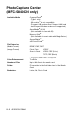

Table Of Contents
- USER’S GUIDE MFC-5440CN/MFC-5840CN
- Brother numbers
- Ordering accessories and supplies
- Safety precautions
- Choosing a location
- Quick Reference Guide
- Table of Contents
- 1 Introduction
- 2 Getting started
- Initial Setup
- General Setup
- Setting the Mode Timer
- Setting the Paper Type
- Setting the Paper Size
- Setting the Ring Volume
- Setting the Beeper Volume
- Setting the Speaker Volume
- Turning on Automatic Daylight Savings Time
- Setting the LCD Contrast
- Setting the Tray Use for Copy mode (MFC-5840CN only)
- Setting the Tray Use for Fax mode (MFC-5840CN only)
- 3 Setup Send
- 4 Setup Receive
- 5 Quick-Dial numbers and dialing options
- 6 Remote Fax Options (Not available for color faxes)
- 7 Printing reports
- 8 Making copies
- 9 Walk-Up PhotoCapture Center™ (MFC-5840CN only)
- 10 Important information
- 11 Troubleshooting and routine maintenance
- Appendix A
- Appendix B
- Glossary
- Specifications
- Index
- Remote Retrieval Access card
- brother USA/CAN
S - 5 SPECIFICATIONS
PhotoCapture Center
(MFC-5840CN only)
Available Media CompactFlash
®
(Type
Ι
only)
(Microdrive
™
is not compatible)
(Compact I/O card such as Compact LAN card
and Compact Modem card are not supported.)
SmartMedia
®
(3.3V)
(Not available for use with ID)
Memory Stick
®
(Not available for music data with MagicGate
™
)
SecureDigital
™
xD-Picture Card
™
File Extension
(Media Format)
(Image Format)
DPOF, EXIF, DCF
Photo Print: JPEG*
Scan to Card: JPEG, PDF (Color)
TIFF, PDF (Black)
* Progressive JPEG format is not supported.
Color Enhancement True2Life
Number of Files Up to 999 files in the media card
Folder File must be in the 3rd folder level of the Media
Card.
Borderless Letter, A4, Photo Card