
User Manual

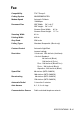

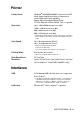
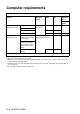
Table Of Contents
- USER’S GUIDE MFC-5440CN/MFC-5840CN
- Brother numbers
- Ordering accessories and supplies
- Safety precautions
- Choosing a location
- Quick Reference Guide
- Table of Contents
- 1 Introduction
- 2 Getting started
- Initial Setup
- General Setup
- Setting the Mode Timer
- Setting the Paper Type
- Setting the Paper Size
- Setting the Ring Volume
- Setting the Beeper Volume
- Setting the Speaker Volume
- Turning on Automatic Daylight Savings Time
- Setting the LCD Contrast
- Setting the Tray Use for Copy mode (MFC-5840CN only)
- Setting the Tray Use for Fax mode (MFC-5840CN only)
- 3 Setup Send
- 4 Setup Receive
- 5 Quick-Dial numbers and dialing options
- 6 Remote Fax Options (Not available for color faxes)
- 7 Printing reports
- 8 Making copies
- 9 Walk-Up PhotoCapture Center™ (MFC-5840CN only)
- 10 Important information
- 11 Troubleshooting and routine maintenance
- Appendix A
- Appendix B
- Glossary
- Specifications
- Index
- Remote Retrieval Access card
- brother USA/CAN
SPECIFICATIONS S - 4
Copy
Color/Black Color/Black
Document Size ADF Width: 5.8" to 8.5"
ADF Height: 5.8" to 14"
Scanner Glass Width: 8.5 in.
Scanner Glass Height: 11.7 in.
Copy Speed Black
Up to 17 pages/minute (Letter paper)*
Color
Up to 11 pages/minute (Letter paper)*
* Does not include the time it takes to feed the paper.
Based on Brother standard pattern. (Fast mode/Stack Copy)
Copy speeds vary with the complexity of the document.
Multiple Copies Stacks/Sorts up to 99 pages
Enlarge/Reduce 25% to 400% (in increments of 1%)
Resolution Up to 600 x 1200 dpi copy resolution for plain,
1200 x 1200 dpi for inkjet, glossy paper and
OHP/transparency.