
User Manual



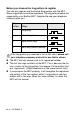

Table Of Contents
- USER’S GUIDE MFC-5440CN/MFC-5840CN
- Brother numbers
- Ordering accessories and supplies
- Safety precautions
- Choosing a location
- Quick Reference Guide
- Table of Contents
- 1 Introduction
- 2 Getting started
- Initial Setup
- General Setup
- Setting the Mode Timer
- Setting the Paper Type
- Setting the Paper Size
- Setting the Ring Volume
- Setting the Beeper Volume
- Setting the Speaker Volume
- Turning on Automatic Daylight Savings Time
- Setting the LCD Contrast
- Setting the Tray Use for Copy mode (MFC-5840CN only)
- Setting the Tray Use for Fax mode (MFC-5840CN only)
- 3 Setup Send
- 4 Setup Receive
- 5 Quick-Dial numbers and dialing options
- 6 Remote Fax Options (Not available for color faxes)
- 7 Printing reports
- 8 Making copies
- 9 Walk-Up PhotoCapture Center™ (MFC-5840CN only)
- 10 Important information
- 11 Troubleshooting and routine maintenance
- Appendix A
- Appendix B
- Glossary
- Specifications
- Index
- Remote Retrieval Access card
- brother USA/CAN

A - 3 APPENDIX A
Before you choose the ring pattern to register
You can only register one Distinctive Ring pattern with the MFC.
Some ring patterns cannot be registered. The ring patterns below are
supported by your Brother MFC. Register the one your telephone
company gives you.
■
The MFC will only answer calls to its registered number.
■
The first two rings are silent on the MFC. This is because the fax
must «listen» to the ring pattern (to compare it to the pattern that
was ‘registered’). (Other telephones on the same line will ring.)
■
If you program the MFC properly, it will recognize the registered
ring pattern of the ‘fax number’ within 2 ring patterns and then
answer with a fax tone. When the ‘voice number’ is called, the
MFC will not answer.
Ring
Pattern
Rings
1 long-long
2 short-long-short
3 short-short-long
4 very long (normal pattern)
If the ring pattern you received is not on this chart, please call
your telephone company and ask for one that is shown.