
User Manual


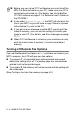
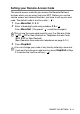
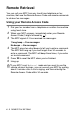
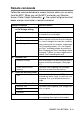

Table Of Contents
- USER’S GUIDE MFC-5440C/MFC-5840CN
- APPROVAL INFORMATION
- Compilation and Publication Notice
- Safety precautions
- Choosing a location
- Quick Reference Guide
- Table of Contents
- 1 Introduction
- 2 Getting started
- 3 Setup Send
- How to enter Fax mode
- How to dial
- How to Fax (B&W and Colour)
- Basic sending operations
- Advanced sending operations
- Broadcasting (Not available for colour faxes)
- Overseas Mode
- Delayed Fax (Not available for colour faxes)
- Delayed Batch Transmission (Not available for colour faxes)
- Setup for Polled Transmit (Standard) (Not available for colour faxes)
- Setup for Polled Transmit with Secure Code (Not available for colour faxes)
- TX Lock (Key Lock for some countries)
- Faxing letter size documents from the scanner glass
- 4 Setup Receive
- 5 Quick-Dial numbers and dialling options
- 6 Remote Fax Options (Not available for colour faxes)
- 7 Printing reports
- 8 Making copies
- 9 Walk-Up PhotoCapture Center™ (MFC-5840CN only)
- 10 Important information
- 11 Troubleshooting and routine maintenance
- Appendix A
- Telephone Service for Australia
- Telephone Service for New Zealand
- Telephone Service for Some Countries
- Advanced receiving operations
- Connecting an external device to your MFC
- Appendix B
- Glossary
- Specifications
- Index
- Remote Retrieval Access card
- brother ARL/ASA/NZ

6 - 7 REMOTE FAX OPTIONS
Retrieving fax messages
You can call your MFC from any touch tone phone and have your fax
messages sent to a fax machine.
1
Dial your fax number.
2
When your MFC answers, immediately enter your Remote
Access Code (3 digits followed by ). If you hear one long
beep, you have messages.
3
As soon as you hear two short beeps, use the dial pad to press
962
.
4
Wait for the long beep, and then use the dial pad to enter the
number of the remote fax machine where you want your fax
messages sent to followed by
##
(up to 20 digits).
5
Hang up after you hear your MFC beep. Your MFC will call the
other machine, which will then print your fax messages.
Changing your Fax Forwarding number
You can change the default setting of your fax forwarding number
from another telephone or fax machine using touch tone.
1
Dial your fax number.
2
When your MFC answers, immediately enter your Remote
Access Code (3 digits followed by ). If you hear one long
beep, you have messages.
3
When you hear two short beeps, use the dial pad to press
954
.
4
Wait for the long beep, and then use the dial pad to enter the
new number of the remote fax machine where you want your fax
messages forwarded followed by
##
(up to 20 digits).
5
Hang up after you hear your MFC beep.
You cannot use and
#
as dial numbers. However, press
#
if
you want to store a pause.
You cannot use and
#
as dial numbers. However, press
#
if
you want to store a pause.