
User Manual


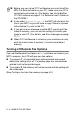
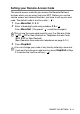
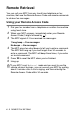
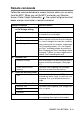

Table Of Contents
- USER’S GUIDE MFC-5440C/MFC-5840CN
- APPROVAL INFORMATION
- Compilation and Publication Notice
- Safety precautions
- Choosing a location
- Quick Reference Guide
- Table of Contents
- 1 Introduction
- 2 Getting started
- 3 Setup Send
- How to enter Fax mode
- How to dial
- How to Fax (B&W and Colour)
- Basic sending operations
- Advanced sending operations
- Broadcasting (Not available for colour faxes)
- Overseas Mode
- Delayed Fax (Not available for colour faxes)
- Delayed Batch Transmission (Not available for colour faxes)
- Setup for Polled Transmit (Standard) (Not available for colour faxes)
- Setup for Polled Transmit with Secure Code (Not available for colour faxes)
- TX Lock (Key Lock for some countries)
- Faxing letter size documents from the scanner glass
- 4 Setup Receive
- 5 Quick-Dial numbers and dialling options
- 6 Remote Fax Options (Not available for colour faxes)
- 7 Printing reports
- 8 Making copies
- 9 Walk-Up PhotoCapture Center™ (MFC-5840CN only)
- 10 Important information
- 11 Troubleshooting and routine maintenance
- Appendix A
- Telephone Service for Australia
- Telephone Service for New Zealand
- Telephone Service for Some Countries
- Advanced receiving operations
- Connecting an external device to your MFC
- Appendix B
- Glossary
- Specifications
- Index
- Remote Retrieval Access card
- brother ARL/ASA/NZ

REMOTE FAX OPTIONS 6 - 6
Remote commands
Follow the commands below to access features when you are away
from the MFC. When you call the MFC and enter your Remote
Access Code (3 digits followed by ), the system will give two short
beeps and you must enter a remote command.
Remote commands Operation details
95 Change the Fax Forwarding
or Fax Storage settings
1 OFF You can select
Off
after you have retrieved
or erased all your messages.
2 Fax Forwarding If you hear one long beep, the change has
been accepted. If you hear three short beeps,
you cannot change it because the conditions
have not been met (for example, registering a
Fax Forwarding number). You can register
your Fax Forwarding number by entering 4.
(See Changing your Fax Forwarding number
on page 6-7.) Once you have registered the
number, Fax Forwarding will work.
4 Fax Forwarding number
6 Fax Storage
96 Retrieve a fax
2 Retrieve all faxes Enter the number of a remote fax machine to
receive stored fax message(s). (See page
6-7.)
3 Erase faxes from the
memory
If you hear one long beep, fax messages
have been erased from the memory.
97 Check the receiving status
1 Fax
You can check whether your MFC has
received any faxes. If yes, you will hear one
long beep. If no, you will hear three short
beeps.
98 Change the Receive Mode
1 External TAD
If you hear one long beep, your change has
been accepted.
2 Fax/Tel
3 Fax Only
90 Exit Press 90 to exit Remote Retrieval. Wait for
the long beep, then replace the handset.