
User Manual
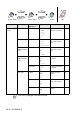
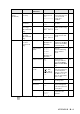
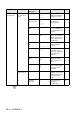

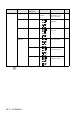
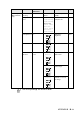
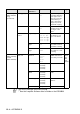
Table Of Contents
- USER’S GUIDE MFC-5440C/MFC-5840CN
- APPROVAL INFORMATION
- Compilation and Publication Notice
- Safety precautions
- Choosing a location
- Quick Reference Guide
- Table of Contents
- 1 Introduction
- 2 Getting started
- 3 Setup Send
- How to enter Fax mode
- How to dial
- How to Fax (B&W and Colour)
- Basic sending operations
- Advanced sending operations
- Broadcasting (Not available for colour faxes)
- Overseas Mode
- Delayed Fax (Not available for colour faxes)
- Delayed Batch Transmission (Not available for colour faxes)
- Setup for Polled Transmit (Standard) (Not available for colour faxes)
- Setup for Polled Transmit with Secure Code (Not available for colour faxes)
- TX Lock (Key Lock for some countries)
- Faxing letter size documents from the scanner glass
- 4 Setup Receive
- 5 Quick-Dial numbers and dialling options
- 6 Remote Fax Options (Not available for colour faxes)
- 7 Printing reports
- 8 Making copies
- 9 Walk-Up PhotoCapture Center™ (MFC-5840CN only)
- 10 Important information
- 11 Troubleshooting and routine maintenance
- Appendix A
- Telephone Service for Australia
- Telephone Service for New Zealand
- Telephone Service for Some Countries
- Advanced receiving operations
- Connecting an external device to your MFC
- Appendix B
- Glossary
- Specifications
- Index
- Remote Retrieval Access card
- brother ARL/ASA/NZ

APPENDIX B B - 4
1
.
General
Setup
(Continued)
5
.
P.Save
Setting
—
Fax
Receive:On
Fax
Receive:Off
Customizes the
Power Save key not
to receive fax in
power save
condition.
1-6
6
.
LCD
Contrast
—
Light
Dark
Adjust the contrast of
the LCD.
2-8
7
.
Tray
Use:Copy
(MFC-5840CN
only)
— Tray#1 Only
Tray#2 Only
Auto Select
Select the tray that
will be used for Copy
mode.
2-8
8
.
Tray
Use:Fax
(MFC-5840CN
only)
— Tray#1 Only
Tray#2 Only
Auto Select
Select the tray that
will be used for Fax
mode.
2-9
2
.
Fax 1
.
Setup
Receive
(In Fax mode
only)
1
.
Ring Delay 02-10(02)
(Example for
Australia)
Sets the number of
rings before the MFC
answers in Fax Only
or Fax/Tel mode.
4-2
2
.
F/T Ring
Time
70 Sec
40 Sec
30 Sec
20 Sec
(Example for
Australia)
Sets the
pseudo/double-ring
time in Fax/Tel
mode.
4-3
3
.
Fax Detect On
Off
Receives fax
messages without
pressing the Mono
Start or Colour Start
key.
4-4
4
.
Remote
Code
On
( 51, #51)
( 91, #91 for
New Zealand)
Off
You can answer all
calls at an extension
or external phone
and use codes to turn
the MFC on or off.
You can personalize
these codes.
A-15
5
.
Auto
Reduction
On
Off
Reduces the size of
incoming faxes.
4-5
6
.
Memory
Receive
On
Off
Automatically stores
any incoming faxes
in its memory if it runs
out of paper.
4-6
7
.
Polling RX
Standard
Secure
Timer
Sets up your MFC to
poll another fax
machine.
4-7
Main Menu Submenu Menu
Selections
Options Descriptions Page
The factory settings are shown in Bold.