
Printer/Fax/Scanner/Copier USER'S GUIDE MFC-5460CN, MFC-5860CN

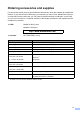
Table Of Contents
- USER’S GUIDE MFC-5460CN MFC-5860CN
- Brother numbers
- Ordering accessories and supplies
- Compilation and Publication Notice
- Table of Contents
- General
- 1 General Information
- 2 Loading documents and paper
- 3 General setup
- 4 Security features
- Fax
- 5 Sending a fax
- Entering Fax mode
- Broadcasting (Black & White only)
- Additional sending operations
- Sending faxes using multiple settings
- Contrast
- Changing Resolution
- Dual access (Black & White only)
- Real time transmission
- Overseas Mode
- Delayed Faxing (Black & White only)
- Delayed Batch Transmission (Black & White only)
- Checking and canceling waiting jobs
- Sending a fax manually
- Sending a fax at the end of a conversation
- Out of Memory message
- 6 Receiving a Fax
- 7 Telephone Services and External devices
- 8 Dialing and storing numbers
- 9 Remote fax options
- 10 Printing Reports
- 11 Polling
- 5 Sending a fax
- Copy
- Walk-up Photo Printing
- Software
- Appendixes
- A Safety and Legal
- Choosing a location
- To use the machine safely
- Important safety instructions
- Standard telephone and FCC Notices (These notices are in effect on models sold and used in the United States only.)
- Federal Communications Commission (FCC) Declaration of Conformity (USA only)
- Industry Canada Compliance Statement (Canada only)
- LAN connection
- Legal limitations for copying
- Trademarks
- B Troubleshooting and Routine Maintenance
- C Menu and Features
- D Specifications
- E Glossary
- F Index
- A Safety and Legal
- brother USA/CAN
iii
Ordering accessories and supplies
For best quality results use only genuine Brother accessories, which are available at most Brother
retailers. If you cannot find the accessory you need and you have a Visa, MasterCard, Discover,
or American Express credit card, you can order accessories directly from Brother. (In the USA,
you can visit us online for a complete selection of the Brother accessories and supplies that are
available for purchase.)
1
Available in the USA and from November 2006 in Canada.
In USA: 1-888-879-3232 (voice)
1-800-947-1445 (fax)
http://www.brothermall.com
In Canada: 1-877-BROTHER (voice)
Description Item
Ink Cartridge Standard <black> LC51BK (Prints approx. 500 pages)
Ink Cartridge High Yield <black> LC51HY-BK (Prints approx. 900 pages)
Ink Cartridge <yellow> LC51Y (Prints approx. 400 pages)
Ink Cartridge <cyan> (blue) LC51C (Prints approx. 400 pages)
Ink Cartridge <magenta> (red) LC51M (Prints approx. 400 pages)
Premium Glossy Photo Paper
(Letter size / 20 sheets)
(4" × 6" size / 20 sheets)
BP61GLL
1
BP61GLP
1
Matte Inkjet Paper
(Letter size / 25 sheets)
BP60ML (USA only)
Inkjet Plain Paper
(Letter size / 250 sheets)
BP60PL (USA only)
Telephone Line Cord LG3077001 (USA only)
User's Guide LP3292001 (English for USA and Canada)
LP3292002 (French For Canada)