
Printer/Fax/Scanner/Copier USER'S GUIDE MFC-5460CN, MFC-5860CN
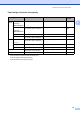




Table Of Contents
- USER’S GUIDE MFC-5460CN MFC-5860CN
- Brother numbers
- Ordering accessories and supplies
- Compilation and Publication Notice
- Table of Contents
- General
- 1 General Information
- 2 Loading documents and paper
- 3 General setup
- 4 Security features
- Fax
- 5 Sending a fax
- Entering Fax mode
- Broadcasting (Black & White only)
- Additional sending operations
- Sending faxes using multiple settings
- Contrast
- Changing Resolution
- Dual access (Black & White only)
- Real time transmission
- Overseas Mode
- Delayed Faxing (Black & White only)
- Delayed Batch Transmission (Black & White only)
- Checking and canceling waiting jobs
- Sending a fax manually
- Sending a fax at the end of a conversation
- Out of Memory message
- 6 Receiving a Fax
- 7 Telephone Services and External devices
- 8 Dialing and storing numbers
- 9 Remote fax options
- 10 Printing Reports
- 11 Polling
- 5 Sending a fax
- Copy
- Walk-up Photo Printing
- Software
- Appendixes
- A Safety and Legal
- Choosing a location
- To use the machine safely
- Important safety instructions
- Standard telephone and FCC Notices (These notices are in effect on models sold and used in the United States only.)
- Federal Communications Commission (FCC) Declaration of Conformity (USA only)
- Industry Canada Compliance Statement (Canada only)
- LAN connection
- Legal limitations for copying
- Trademarks
- B Troubleshooting and Routine Maintenance
- C Menu and Features
- D Specifications
- E Glossary
- F Index
- A Safety and Legal
- brother USA/CAN
22
3
On/Off key 3
When the machine is idle, you can turn it on
and off by pressing the On/Off key.
Note
If you have connected an external
telephone or TAD, it is always available.
Turning the machine off 3
a Press and hold down the On/Off key
until the LCD shows Shutting Down.
The LCD light goes off.
Turning the machine on 3
a Press and hold down the On/Off key
until the LCD shows Please Wait.
The LCD shows the date and time.
On/Off setting 3
You can customize the machine's On/Off
key. The default setting is
Fax Receive:Off. Your machine will not
work when it is switched off, but it will clean
the print head periodically. If you turn this
setting to Fax Receive:On, you can
receive faxes or calls even when the machine
is switched off. (See On/Off key on page 22.)
a Press Menu, 1, 6.
b Press a or b to choose
Fax Receive:On, or
Fax Receive:Off.
Press OK.
c Press Stop/Exit.
1
Should be set before you switch off the machine.
2
You cannot receive a fax automatically even if you
have set the receive mode to Fax/Tel.
General setup 3
On/Off
setting
Receive
mode
Available
operations
Fax Receive:
Off
(default)
— No machine
operations will be
available.
Fax Receive:
On
Fax Only
External
TAD
Fax Receive
Easy Receive
Delayed Fax
1
Remote Fax
Options
1
Remote Retrieval
1
You cannot
receive a fax with
Black Start or
Color Start.
Manual
Fax/Tel
2
Easy Receive
Delayed Fax
1
You cannot
receive a fax with
Black Start or
Color Start.