
Printer/Fax/Scanner/Copier USER'S GUIDE MFC-5460CN, MFC-5860CN

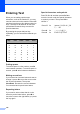
Table Of Contents
- USER’S GUIDE MFC-5460CN MFC-5860CN
- Brother numbers
- Ordering accessories and supplies
- Compilation and Publication Notice
- Table of Contents
- General
- 1 General Information
- 2 Loading documents and paper
- 3 General setup
- 4 Security features
- Fax
- 5 Sending a fax
- Entering Fax mode
- Broadcasting (Black & White only)
- Additional sending operations
- Sending faxes using multiple settings
- Contrast
- Changing Resolution
- Dual access (Black & White only)
- Real time transmission
- Overseas Mode
- Delayed Faxing (Black & White only)
- Delayed Batch Transmission (Black & White only)
- Checking and canceling waiting jobs
- Sending a fax manually
- Sending a fax at the end of a conversation
- Out of Memory message
- 6 Receiving a Fax
- 7 Telephone Services and External devices
- 8 Dialing and storing numbers
- 9 Remote fax options
- 10 Printing Reports
- 11 Polling
- 5 Sending a fax
- Copy
- Walk-up Photo Printing
- Software
- Appendixes
- A Safety and Legal
- Choosing a location
- To use the machine safely
- Important safety instructions
- Standard telephone and FCC Notices (These notices are in effect on models sold and used in the United States only.)
- Federal Communications Commission (FCC) Declaration of Conformity (USA only)
- Industry Canada Compliance Statement (Canada only)
- LAN connection
- Legal limitations for copying
- Trademarks
- B Troubleshooting and Routine Maintenance
- C Menu and Features
- D Specifications
- E Glossary
- F Index
- A Safety and Legal
- brother USA/CAN

132
Entering Text C
When you are setting certain menu
selections, such as the Station ID, you may
need to enter text into the machine. Most dial
pad keys have three or four letters printed on
keys. The keys for 0, # and l do not have
printed letters because they are used for
special characters.
By pressing the proper dial pad key
repeatedly, you can access the character you
want.
Putting spaces C
To enter a space in a fax number, press c
once between numbers. To enter a space in
a name, press c twice between characters.
Making corrections C
If you entered an incorrect letter and want to
change it, press d to move the cursor under
the incorrect character. Then press
Clear/Back. Re-enter the correct character.
You can also back up and insert letters.
Repeating letters C
If you need to enter a letter that is on the
same key as the letter before, press c to
move the cursor to the right before you press
the key again.
Special characters and symbols C
Press l, # or 0, and then press d or c to
move the cursor under the special character
or symbol you want. Then press OK to
choose it.
Press
Key
one
time
two
times
three
times
four
times
2 ABC2
3 DEF3
4 GH I 4
5 JKL5
6 MNO6
7 PQRS
8 TUV8
9 WXYZ
Press l for (space) ! " # $ % & ' ( ) l
+ , - . / m
Press # for : ; < = > ? @ [ ] ^ _
Press 0 for É À È Ê Î Ç Ë Ö 0