
Printer/Fax/Scanner/Copier USER'S GUIDE MFC-5460CN, MFC-5860CN
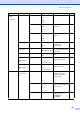
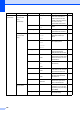
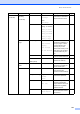

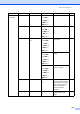
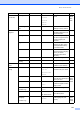
Table Of Contents
- USER’S GUIDE MFC-5460CN MFC-5860CN
- Brother numbers
- Ordering accessories and supplies
- Compilation and Publication Notice
- Table of Contents
- General
- 1 General Information
- 2 Loading documents and paper
- 3 General setup
- 4 Security features
- Fax
- 5 Sending a fax
- Entering Fax mode
- Broadcasting (Black & White only)
- Additional sending operations
- Sending faxes using multiple settings
- Contrast
- Changing Resolution
- Dual access (Black & White only)
- Real time transmission
- Overseas Mode
- Delayed Faxing (Black & White only)
- Delayed Batch Transmission (Black & White only)
- Checking and canceling waiting jobs
- Sending a fax manually
- Sending a fax at the end of a conversation
- Out of Memory message
- 6 Receiving a Fax
- 7 Telephone Services and External devices
- 8 Dialing and storing numbers
- 9 Remote fax options
- 10 Printing Reports
- 11 Polling
- 5 Sending a fax
- Copy
- Walk-up Photo Printing
- Software
- Appendixes
- A Safety and Legal
- Choosing a location
- To use the machine safely
- Important safety instructions
- Standard telephone and FCC Notices (These notices are in effect on models sold and used in the United States only.)
- Federal Communications Commission (FCC) Declaration of Conformity (USA only)
- Industry Canada Compliance Statement (Canada only)
- LAN connection
- Legal limitations for copying
- Trademarks
- B Troubleshooting and Routine Maintenance
- C Menu and Features
- D Specifications
- E Glossary
- F Index
- A Safety and Legal
- brother USA/CAN
Menu and Features
131
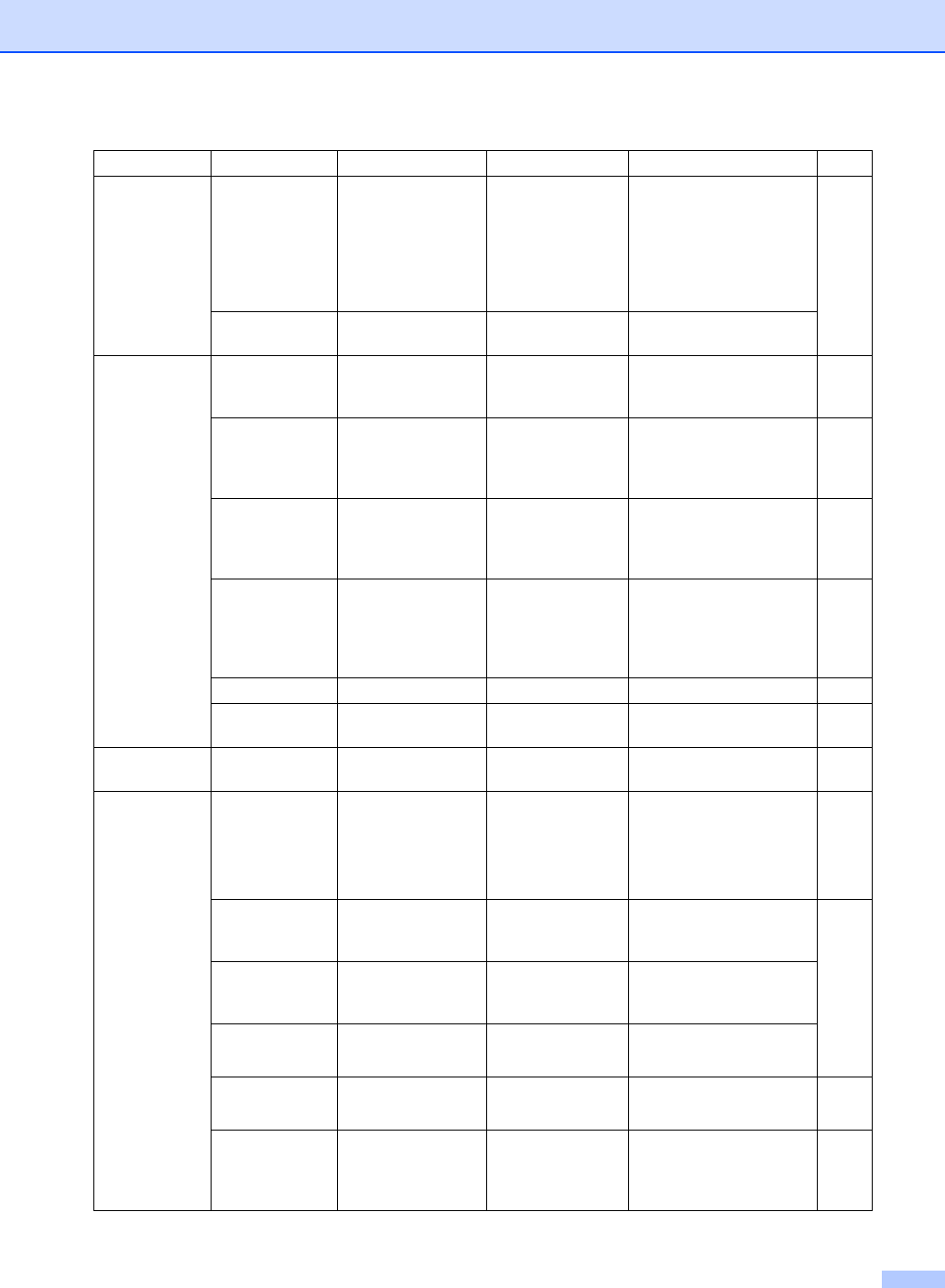
5.LAN
(Continued)
2.Setup Misc.
1.Ethernet Auto*
100B-FD
100B-HD
10B-FD
10B-HD
Chooses Ethernet link
mode.
See
Network
User’s
Guide
0.Factory Re
set
— — Restore all network
settings to factory default.
6.Print
Reports
1.
Transmission
— — Prints a Transmission
Verification Report for your
last transmission.
62
2.Help List — — Prints the Help List so you
can see at-a-glance how to
quickly program your
machine.
62
3.Quick-Dial — — Lists name and numbers
stored in the One-Touch
and Speed-Dial memory,
in numerical order.
62
4.
Fax Journal
— — Lists information about the
last incoming and outgoing
faxes. (TX means
Transmit.) (RX means
Receive.)
62
5.
User Settings
— — Lists your settings. 62
6.Network
Config
— — Lists your settings. 62
7.Machine
Info.
1.Serial No. — — Lets you check the serial
number of your machine.
120
0.Initial
Setup
1.
Receive Mode
— Fax Only*
Fax/Tel
External TAD
Manual
Choose the receive mode
that best suits your needs.
38
2.Date/Time — — Puts the date and time on
the LCD and in headings of
faxes you send.
See
Quick
Setup
Guide
3.Station ID — Fax:
Name:
Set your name and fax
number to appear on each
page you fax.
4.Tone/Pulse
(Canada only)
— Tone*
Pulse
Choose the dialing mode.
5.Dial Tone — Detection
No Detection*
You can shorten the dial
tone detect pause.
112
0.Local
Language
(Canada only)
— English*
French
Allows you to change the
LCD language for your
country.
See
Quick
Setup
Guide
Main Menu Submenu Menu Selections Options Descriptions Page