
Printer/Fax/Scanner/Copier USER'S GUIDE MFC-5460CN, MFC-5860CN
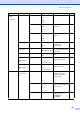
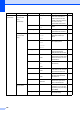
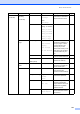

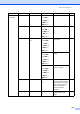
Table Of Contents
- USER’S GUIDE MFC-5460CN MFC-5860CN
- Brother numbers
- Ordering accessories and supplies
- Compilation and Publication Notice
- Table of Contents
- General
- 1 General Information
- 2 Loading documents and paper
- 3 General setup
- 4 Security features
- Fax
- 5 Sending a fax
- Entering Fax mode
- Broadcasting (Black & White only)
- Additional sending operations
- Sending faxes using multiple settings
- Contrast
- Changing Resolution
- Dual access (Black & White only)
- Real time transmission
- Overseas Mode
- Delayed Faxing (Black & White only)
- Delayed Batch Transmission (Black & White only)
- Checking and canceling waiting jobs
- Sending a fax manually
- Sending a fax at the end of a conversation
- Out of Memory message
- 6 Receiving a Fax
- 7 Telephone Services and External devices
- 8 Dialing and storing numbers
- 9 Remote fax options
- 10 Printing Reports
- 11 Polling
- 5 Sending a fax
- Copy
- Walk-up Photo Printing
- Software
- Appendixes
- A Safety and Legal
- Choosing a location
- To use the machine safely
- Important safety instructions
- Standard telephone and FCC Notices (These notices are in effect on models sold and used in the United States only.)
- Federal Communications Commission (FCC) Declaration of Conformity (USA only)
- Industry Canada Compliance Statement (Canada only)
- LAN connection
- Legal limitations for copying
- Trademarks
- B Troubleshooting and Routine Maintenance
- C Menu and Features
- D Specifications
- E Glossary
- F Index
- A Safety and Legal
- brother USA/CAN

Menu and Features
125
1.General
Setup
(Continued)
4.Volume 1.Ring Off
Low
Med*
High
Adjusts the ring volume. 25
2.Beeper Off
Low*
Med
High
Adjusts the volume level of
the beeper.
25
3.Speaker Off
Low
Med*
High
Adjusts the speaker
volume.
26
5.
Auto Daylight
— On
Off*
Changes for Daylight
Savings Time
automatically.
26
6.On/Off
Setting
— Fax Receive:On
Fax Receive:Off
*
Customizes the On/Off
key to receive faxes even
in off mode.
22
7.
LCD Contrast
— Light*
Dark
Adjusts the contrast of the
LCD.
26
8.
Tray Use:Copy
(MFC-5860CN
only)
— Tray#1 Only
Tray#2 Only
Auto Select*
Choose the tray that will be
used for Copy mode.
25
9.
Tray Use:Fax
(MFC-5860CN
only)
— Tray#1 Only
Tray#2 Only
Auto Select*
Choose the tray that will be
used for Fax mode.
24
2.Fax 1.
Setup Receive
(In Fax mode
only)
1.Ring Delay 00
01
02
03
04*
Sets the number of rings
before the machine
answers in Fax Only or
Fax/Tel mode.
38
2.F/T Ring Time 20 Secs*
30 Secs
40 Secs
70 Secs
Sets the
pseudo/double-ring time in
Fax/Tel mode.
39
3.Easy Receive On*
Off
Receives fax messages
without pressing
Black Start or
Color Start.
39
Main Menu Submenu Menu Selections Options Descriptions Page