
User Manual
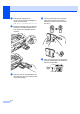
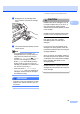


Table Of Contents
- USER’S GUIDE MFC-490CW
- Approval Information and Compilation and Publication Notice
- Table of Contents
- Section I General
- 1 General Information
- 2 Loading paper and documents
- 3 General setup
- 4 Security features
- Section II Fax
- 5 Sending a Fax
- Entering Fax mode
- Broadcasting (Monochrome only)
- Additional sending operations
- Sending faxes using multiple settings
- Contrast
- Changing fax resolution
- Dual access (Monochrome only)
- Real time transmission
- Overseas Mode
- Delayed Faxing (Monochrome only)
- Delayed Batch Transmission (Monochrome only)
- Checking and cancelling waiting jobs
- Setting your changes as a new default
- Restoring all settings to the factory settings
- Sending a fax manually
- Out of Memory message
- 6 Receiving a Fax
- 7 Telephone and External devices
- 8 Dialling and storing numbers
- 9 Printing Reports
- 10 Polling
- 5 Sending a Fax
- Section III Copy
- 11 Making copies
- How to copy
- Copy settings
- ‘Out of Memory’ message
- 11 Making copies
- Section IV Direct Photo Printing
- Section V Software
- Section VI Appendixes
- A Safety and Legal
- B Troubleshooting and Routine Maintenance
- C Menu and Features
- D Specifications
- E Glossary
- Index
- brother CHN-ENG

Troubleshooting and Routine Maintenance
133
B
f Gently push the ink cartridge until it
clicks, and then close the ink cartridge
cover.
g The machine will automatically reset the
ink dot counter.
Note
• If you replaced an ink cartridge, for
example Black, the LCD may ask you to
verify that it was a brand new one (for
example, Did You Change Black).
For each new cartridge you installed,
press 1 (Yes) to automatically reset the
ink dot counter for that color. If the ink
cartridge you installed is not a brand new
one, be sure to press 2 (No).
• If the LCD shows No Cartridge or
Cannot Detect after you install the ink
cartridges, check that the ink cartridges
are installed correctly.
WARNING
If ink gets in your eyes, wash them out with
water at once and call a doctor if you are
concerned.
CAUTION
DO NOT take out ink cartridges if you do
not need to replace them. If you do so, it
may reduce the ink quantity and the
machine will not know the quantity of ink left
in the cartridge.
DO NOT touch the cartridge insertion slots.
If you do so, the ink may stain your skin.
If ink gets on your skin or clothing
immediately wash it off with soap or
detergent.
If you mix the colors by installing an ink
cartridge in the wrong position, clean the
print head several times after correcting the
cartridge installation.
Once you open an ink cartridge, install it in
the machine and use it up within six months
of installation. Use unopened ink cartridges
by the expiration date written on the
cartridge package.
DO NOT dismantle or tamper with the ink
cartridge, this can cause the ink to leak out
of the cartridge.