
User Manual


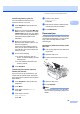


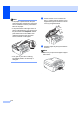
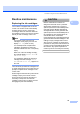
Table Of Contents
- USER’S GUIDE MFC-490CW
- Approval Information and Compilation and Publication Notice
- Table of Contents
- Section I General
- 1 General Information
- 2 Loading paper and documents
- 3 General setup
- 4 Security features
- Section II Fax
- 5 Sending a Fax
- Entering Fax mode
- Broadcasting (Monochrome only)
- Additional sending operations
- Sending faxes using multiple settings
- Contrast
- Changing fax resolution
- Dual access (Monochrome only)
- Real time transmission
- Overseas Mode
- Delayed Faxing (Monochrome only)
- Delayed Batch Transmission (Monochrome only)
- Checking and cancelling waiting jobs
- Setting your changes as a new default
- Restoring all settings to the factory settings
- Sending a fax manually
- Out of Memory message
- 6 Receiving a Fax
- 7 Telephone and External devices
- 8 Dialling and storing numbers
- 9 Printing Reports
- 10 Polling
- 5 Sending a Fax
- Section III Copy
- 11 Making copies
- How to copy
- Copy settings
- ‘Out of Memory’ message
- 11 Making copies
- Section IV Direct Photo Printing
- Section V Software
- Section VI Appendixes
- A Safety and Legal
- B Troubleshooting and Routine Maintenance
- C Menu and Features
- D Specifications
- E Glossary
- Index
- brother CHN-ENG

130
Note
• If the paper is jammed under the print
head, unplug the machine from the power
source, and then move the print head to
take out the paper.
• If the print head is at the right corner as
shown in the illustration, you cannot move
the print head. Press Stop/Exit until the
print head moves to the middle. Then
unplug the machine from the power
source, and take out the paper.
• If ink gets on your skin or clothing
immediately wash it off with soap or
detergent.
g Lift the scanner cover to release the
lock (1). Gently push the scanner cover
support down (2) and close the scanner
cover (3) using both hands.
h Push the paper tray firmly back into the
machine.
Note
Make sure you pull out the paper support
until it clicks.
1
2
3