
User Manual


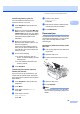


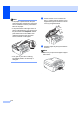
Table Of Contents
- USER’S GUIDE MFC-490CW
- Approval Information and Compilation and Publication Notice
- Table of Contents
- Section I General
- 1 General Information
- 2 Loading paper and documents
- 3 General setup
- 4 Security features
- Section II Fax
- 5 Sending a Fax
- Entering Fax mode
- Broadcasting (Monochrome only)
- Additional sending operations
- Sending faxes using multiple settings
- Contrast
- Changing fax resolution
- Dual access (Monochrome only)
- Real time transmission
- Overseas Mode
- Delayed Faxing (Monochrome only)
- Delayed Batch Transmission (Monochrome only)
- Checking and cancelling waiting jobs
- Setting your changes as a new default
- Restoring all settings to the factory settings
- Sending a fax manually
- Out of Memory message
- 6 Receiving a Fax
- 7 Telephone and External devices
- 8 Dialling and storing numbers
- 9 Printing Reports
- 10 Polling
- 5 Sending a Fax
- Section III Copy
- 11 Making copies
- How to copy
- Copy settings
- ‘Out of Memory’ message
- 11 Making copies
- Section IV Direct Photo Printing
- Section V Software
- Section VI Appendixes
- A Safety and Legal
- B Troubleshooting and Routine Maintenance
- C Menu and Features
- D Specifications
- E Glossary
- Index
- brother CHN-ENG

Troubleshooting and Routine Maintenance
125
B
Unable to Clean XX The machine has a mechanical
problem.
—OR—
A foreign object such as a clip or
ripped paper is in the machine.
Open the scanner cover and remove any
foreign objects inside the machine. If the
error message continues, see Transferring
your faxes or Fax Journal report
on page 126 before disconnecting the
machine so you will not lose any important
messages.
Then, disconnect the machine from the
power source for several minutes and then
reconnect it.
Unable to Init. XX The machine has a mechanical
problem.
—OR—
A foreign object such as a clip or
ripped paper is in the machine.
Open the scanner cover and remove any
foreign objects inside the machine. If the
error message continues, see Transferring
your faxes or Fax Journal report
on page 126 before disconnecting the
machine so you will not lose any important
messages.
Then, disconnect the machine from the
power source for several minutes and then
reconnect it.
Unable to Print XX The machine has a mechanical
problem.
—OR—
A foreign object such as a clip or
ripped paper is in the machine.
Open the scanner cover and remove any
foreign objects inside the machine. If the
error message continues, see Transferring
your faxes or Fax Journal report
on page 126 before disconnecting the
machine so you will not lose any important
messages.
Then, disconnect the machine from the
power source for several minutes and then
reconnect it.
Unable to Scan XX The machine has a mechanical
problem.
—OR—
A foreign object such as a clip or
ripped paper is in the machine.
Open the scanner cover and remove any
foreign objects inside the machine. If the
error message continues, see Transferring
your faxes or Fax Journal report
on page 126 before disconnecting the
machine so you will not lose any important
messages.
Then, disconnect the machine from the
power source for several minutes and then
reconnect it.
Unusable Device
Disconnect device from
front connector & turn
machine off & then on
A broken device has been
connected to the USB direct
interface.
Unplug the device from the USB direct
interface, then press Power Save to turn
the machine off and then on again.
Error Message Cause Action