
User Manual



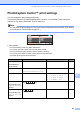


Table Of Contents
- USER’S GUIDE MFC-490CW
- Approval Information and Compilation and Publication Notice
- Table of Contents
- Section I: General
- 1 General Information
- 2 Loading paper and documents
- 3 General setup
- 4 Security features
- Section II: Fax
- 5 Sending a Fax
- Entering Fax mode
- Broadcasting (Monochrome only)
- Additional sending operations
- Sending faxes using multiple settings
- Contrast
- Changing fax resolution
- Dual access (Monochrome only)
- Real time transmission
- Overseas Mode
- Delayed Faxing (Monochrome only)
- Delayed Batch Transmission (Monochrome only)
- Checking and cancelling waiting jobs
- Setting your changes as a new default
- Restoring all settings to the factory settings
- Sending a fax manually
- Out of Memory message
- 6 Receiving a Fax
- 7 Telephone and External devices
- Voice operations
- Telephone Service for Australia
- Telephone Service for New Zealand
- Telephone Service for Some Countries
- Connecting an external TAD (telephone answering device)
- External and extension telephones
- 8 Dialling and storing numbers
- 9 Printing Reports
- 10 Polling
- 5 Sending a Fax
- Section III: Copy
- 11 Making copies
- How to copy
- Copy settings
- ‘Out of Memory’ message
- 11 Making copies
- Section IV: Direct Photo Printing
- Section V: Software
- Section VI: Appendixes
- A Safety and Legal
- B Troubleshooting and Routine Maintenance
- C Menu and Features
- D Specifications
- E Glossary
- Index
- brother ARL/ASA/NZ

Printing photos from a memory card or USB Flash memory drive
93
12
PhotoCapture Center™ print settings 12
You can change the print settings temporarily.
The machine returns to its default settings after 3 minutes, or if the Mode Timer returns the
machine to Fax mode. (See Mode Timer on page 22.)
Note
You can save the print settings you use most often by setting them as the default. (See Setting
your changes as a new default on page 97.)
1 No. of prints
(For View Photo(s), Search by Date, Slide Show)
You can see the total number of photos that will be printed.
(For Print All Photos, Print Photos, Enhance Photos, Trimming)
You can see the number of copies of each photo that will be printed.
(For DPOF printing) This does not appear.
Menu Selections Options 1 Options 2 Page
Print Quality
(Not available for
DPOF printing)
Normal/Photo —94
Paper Type Plain Paper/Inkjet Paper/
Brother BP71/Other Glossy
—94
Paper Size 10x15cm/13x18cm/A4/Letter (When A4 or Letter is chosen)
8 x 10cm/ 9 x 13cm/
10 x 15cm/13 x 18cm/
15 x 20cm/Max. Size
95
Brightness
(Not available when
Enhance Photos is
chosen)
—95
Contrast
(Not available when
Enhance Photos is
chosen)
—95
1
0001
0001
Print Setting
Print Setting
Print Quality
PHOTO
Paper
Paper
Type
ype
Paper Size
Paper Size
Brightness
Brightness
10x15cm
10x15cm
Print Size
Print Size
Max. Size
Max. Size
Other Glossy
Other Glossy
Photo
Print Press Start
0
Dark
Light