
Installation Instructions



11
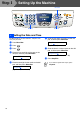
Setting Up
the Machine
Windows
®
Mac OS
®
8.6-9.2
Mac OS
®
X
10.1/10.2.1 or greater
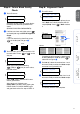
You should store your name and fax number to be
printed on all fax pages that you send.
1
Press Menu/Set.
2
Press .
3
Press .
4
Enter your fax number (up to 20 digits) on
the dial pad, and then press Menu/Set.
5
Use the dial pad to enter your name (up to
20 characters), and then press Menu/Set.
6
Press Stop/Exit.
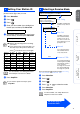
There are four possible receive modes: Fax Only,
Fax/Tel, Manual and External TAD.
1
Press Menu/Set.
2
Press .
3
Press .
4
Press or to select the mode.
5
Press Menu/Set.
6
Press Stop/Exit.
8 Setting Your Station ID
Fax:_
Name:_
■
Refer to the following chart for entering
your name.
■
If you need to enter a character that is on
the same key as the previous character,
press to move the cursor to the right.
Press
key
One
time
Two
times
Three
times
Four
times
2 ABC2
3 DEF3
4 GH I 4
5 JKL5
6 MNO6
7 PQRS
8 TUV8
9 WX Y Z
For more details, see “Setting the Station
ID” in Chapter 4 of the User's Guide.
If you want to repeat from step1, press
Stop/Exit.
9
Selecting a Receive Mode
Are you connecting an external telephone or external
telephone answering device to the MFC?
Are you using the voice message
function of your external
telephone answering device?
Fax Only
The MFC automatically
answers every call as a
fax.
Do you want the MFC to
answer fax calls only?
Fax/Tel
The MFC controls the
line and automatically
answers every call. If
the call is not a fax, the
phone will ring for you to
pick up the call.
Manual
You control the phone
line and must answer
every call yourself.
External TAD
Your external telephone
answering device (TAD)
automatically answers
every call. Voice
messages are stored on
the external TAD. Fax
messages are printed.
For more details, see “Setup Receive” in
Chapter 5 of the User’s Guide.
Yes No
Yes
No
No
Yes
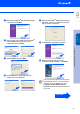
Go to Next page to
install the driver